
Having worked with storage systems for over a decade, I’ve seen Having worked with storage systems5 for over a decade, I’ve seen internal SSDs evolve from expensive enterprise solutions to essential components in modern computing
Internal SSDs deliver superior performance, reliability, and efficiency compared to traditional HDDs, making them essential for modern computing despite their higher cost per gigabyte.
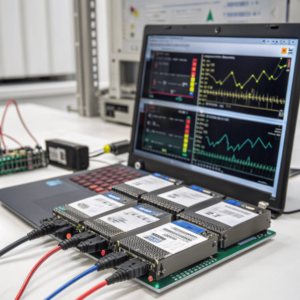
The storage landscape has fundamentally shifted. Where we once accepted slow boot times and sluggish application loading as normal, internal SSDs have redefined our expectations of computer responsiveness.
Are internal SSDs worth it?
After upgrading hundreds of systems over the years, I can confidently say the performance improvement from switching to an internal SSD is transformative. Boot times drop from minutes to seconds, applications launch instantly, and file transfers happen at unprecedented speeds.
Internal SSDs provide dramatic performance improvements over HDDs with boot times reducing from 60+ seconds to under 20 seconds and application loading times improving by 300-500%.
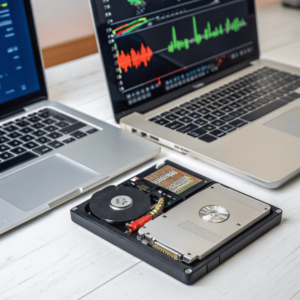
The speed difference comes from fundamental technological advantages. While While HDDs rely on mechanical components – spinning platters and moving read/write heads – SSDs5 use flash memory chips with no moving parts
Beyond raw speed, internal SSDs offer superior reliability. With no moving parts, they’re less prone to mechanical failure and can withstandWith no moving parts, they’re less prone to mechanical failure5 and can withstand physical shocks that would damage HDDs
The cost factor has dramatically improved. While SSDs once commanded premium prices, the gap has narrowed considerably. A 1TB internal SSD now costs around $90 compared to $60 for an equivalent HDD – a reasonable premium for the massive performance gains [19].
What are internal SSDs?
Internal SSDs represent a fundamental shift from mechanical to electronic storage. Unlike traditional HDDs with their spinning platters and mechanical read/write heads, internal SSDs store data in interconnected flash memory chips that retain information even without power.
Internal SSDs are solid-state storage devices that use NAND flash memory chips and sophisticated controllers to store and retrieve data electronically, eliminating mechanical components entirely.
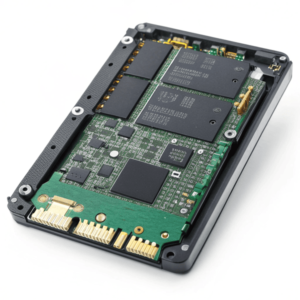
The technology centers around NAND flash memory, which comes in several types based on how many bits each cell stores [7]. Single-Level Cell (SLC) offers the highest performance and endurance but costs more. Multi-Level Cell (MLC) provides balanced performance and value. Triple-Level Cell (TLC) and Quad-Level Cell (QLC) offer higher capacities at lower costs but with reduced performance and endurance.
Internal SSD Form Factors and Interfaces
2.5-inch SATA SSDs: The most common form factor, designed to fit in standard HDD bays [2]. These use the SATA interface with transfer rates up to 6GB/s, making them perfect drop-in replacements for traditional HDDs in both laptops and desktops.
M.2 SSDs: About the size of a stick of gum, these connect directly to the motherboard [2]. M.2 drives can use either SATA or PCIe interfaces, with PCIe NVMe versions offering the highest performance due to their direct connection to the CPU through PCIe lanes.
mSATA SSDs: One-eighth the size of 2.5-inch drives, these plug into mSATA sockets on motherboards [2]. While less common now, they’re still used in ultra-thin devices and as secondary drives in desktops.
The SSD controller acts as the brain of the drive, managing data distribution, wear leveling, error correction, and garbage collection [9]. Advanced controllers include features like TRIM support, which helps maintain performance over time, and sophisticated error correction algorithms that ensure data integrity.
Modern internal SSDs also incorporate various optimization technologies. Over-provisioning reserves extra NAND cells to replace worn-out ones, extending drive lifespan. Write caching temporarily stores data in faster SLC cache before writing to the main storage, improving apparent write speeds for everyday tasks.
Are internal or external SSDs better?
The choice between internal and external SSDs depends on your specific use case, but internal drives generally offer superior performance and value for primary storage applications. Having tested both extensively, the differences are significant and meaningful.
Internal SSDs typically outperform external SSDs due to direct motherboard connections, avoiding USB bandwidth limitations and protocol overhead that can reduce speeds by 50% or more.
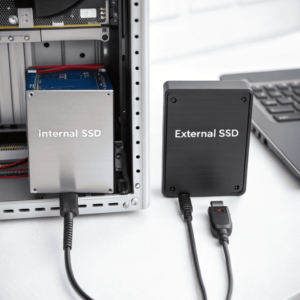
The fundamental advantage of internal SSDs lies in their connection method. Internal drives connect directly to the motherboard via Internal drives connect directly to the motherboard via SATA or PCIe5 interfaces, providing unimpeded access to full bandwidth
Thunderbolt 3: Offers 40 Gb/s bandwidth, allowing external SSDs to reach higher speeds, but still can’t match the performance of direct PCIe connections for NVMe drives [2].
Internal Connections: SATA provides 6 Gb/s while PCIe 4.0 x4 delivers 64 Gb/s of bandwidth, with PCIe 5.0 doubling that again.
Internal SSDs also offer cost advantages. External drives require additional components – enclosures, USB controllers, and cables – that add to manufacturing costs. You often pay a premium for the convenience of portability when the drive will sit stationary in a computer [1].
However, external SSDs excel in specific scenarios. They provide unmatched flexibility, working across multiple devices and operating systems without installation requirements [2]. For backup applications, temporary storage expansion, or data transfer between systems, external SSDs offer clear advantages.
The reliability factor also differs. Internal SSDs benefit from stable power supplies and controlled thermal environments within computer cases. External drives face greater temperature variations and potential for physical damage during transport.
For primary storage – your operating system, applications, and frequently accessed files – internal SSDs represent the optimal choice. They deliver maximum performance, better value, and seamless integration with your system’s architecture. Reserve external SSDs for portability needs, backup applications, and temporary storage expansion where their flexibility outweighs their performance limitations.
Conclusion
Internal SSDs have evolved from luxury components to essential elements of modern computing, delivering transformative performance improvements that justify their investment for virtually every user.
-
Exploring PCIe can help you leverage its speed and efficiency for better data transfer in your systems.
or PCIe interfaces, providing unimpeded access to full bandwidth. External SSDs must traverse USB or Thunderbolt connections, which introduce bottlenecks and protocol overhead [2].Interface Speed Limitations
USB Connections: Even the fastest USB 3.2 Gen 2 connections max out at 10 Gb/s (roughly 1,250 MB/s theoretical), while high-end internal NVMe SSDs can exceed 7,000 MB/s [2]. USB-A connections are even more limiting at 5 Gb/s maximum. ↩ ↩ ↩ ↩
