
Having upgraded storage systems countless times throughout my career, I’ve witnessed the revolutionary impact solid state drives have made on computing performance. From waiting minutes for systems to boot to instant responsiveness, SSDs have fundamentally changed our computing experience.
Solid state drives are storage devices that use NAND flash memory chips instead of spinning mechanical components, delivering dramatically faster performance, improved reliability, and lower power consumption compared to traditional hard drives.
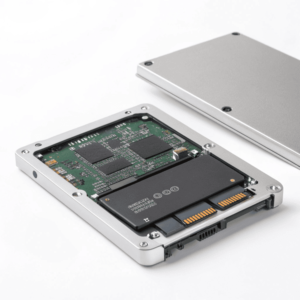
The transition from The transition from mechanical to solid state storage7 represents one of the most significant advances in computing hardware
A solid state drive is a data storage device that uses interconnected NAND flash memory chips managed by sophisticated controllers to store and retrieve data electronically, eliminating all moving parts found in traditional hard drives.
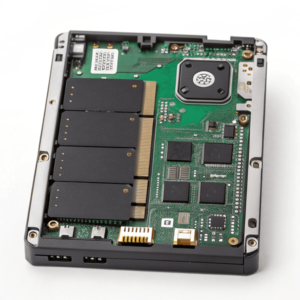
The core technology centers around NAND flash memory, which stores data in memory cells that can be electrically programmed and erased. Unlike volatile RAM that loses data without power, NAND flash memory retains information permanently until actively changed. This non-volatile characteristic makes it ideal for long-term storage applications.
Key Components of Solid State Drives
NAND Flash Memory Chips: These contain billions of memory cells organized into pages and blocks. Each cell stores electrical charge representing data bits, with different types holding varying amounts of information per cell – Single-Level Cell (SLC), Multi-Level Cell (MLC), Triple-Level Cell (TLC), and Quad-Level Cell (QLC).
Controller: The brain of the SSD, this sophisticated processor manages all drive operations including data placement, wear leveling, error correction, garbage collection, and communication with the host system. Advanced controllers implement features like TRIM support and over-provisioning to maintain performance over time.
Cache Memory: High-speed DRAM or SLC NAND cache buffers frequently accessed data and write operations, significantly improving apparent performance for everyday computing tasks.
Interface Connector: SSDs connect to computer systems through various interfaces including SATA, PCIe, or specialized enterprise connections, each offering different bandwidth capabilities and compatibility characteristics.
The absence of mechanical components provides multiple advantages. Without spinning platters, read/write heads, or motor assemblies, SSDs can access any stored data instantly without Without spinning platters, read/write heads, or motor assemblies, SSDs7 can access any stored data instantly without physical seek time limitations
Solid state drives also demonstrate superior durability characteristics. The lack of moving parts makes them resistant to physical shock, vibration, and temperature variations that can damage mechanical drives. Power consumption drops significantly since SSDs don’t require energy to spin motors or move mechanical components.
What is an example of a solid state drive?
Solid state drives come in numerous configurations designed for different applications and performance requirements. Having tested various models across multiple form factors, certain examples stand out for their widespread adoption and proven reliability.
Popular SSD examples include the Samsung 980 PRO M.2 NVMe drive for high-performance applications, the Crucial MX4 2.5" SATA drive for mainstream upgrades, and the Kingston KC3000 for professional workflows requiring sustained performance.
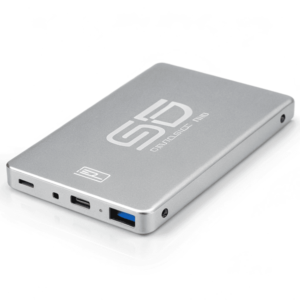
The Samsung 980 PRO represents cutting-edge consumer NVMe technology, delivering sequential read speeds up to 7,000 MB/s through PCIe 4.0 connectivity. This M.2 2280 form factor drive fits directly onto modern motherboards, offering capacities from 250GB to 2TB with consistent performance characteristics across the capacity range.
Consumer SSD Categories and Examples
High-Performance NVMe Drives:
- Samsung 980 PRO: Premium consumer drive with exceptional speed and reliability
- WD Black SN850X: Gaming-focused with excellent sustained performance
- Crucial P5 Plus: Balanced performance with competitive pricing
Mainstream SATA SSDs:
- Samsung 870 EVO: Reliable 2.5″ drive perfect for HDD replacements
- Crucial MX4: Excellent value proposition with solid performance
- Kingston NV2: Budget-friendly option without sacrificing reliability
Enterprise and Professional Models:
- Samsung PM9A3: Data center optimized with enhanced endurance
- Intel Optane 905P: Ultra-low latency for specialized applications
- WD Gold NVMe: Professional workstation drive with enterprise features
Each example serves specific use cases. The Samsung 870 EVO works perfectly as a drop-in replacement for laptop hard drives, providing immediate performance improvements without requiring new hardware. The 980 PRO targets enthusiasts and professionals who need maximum speed for applications like video editing, 3D rendering, or large database operations.
Enterprise examples like the PM9A3 incorporate features unnecessary for consumer use – enhanced error correction, power loss protection, and extended temperature ranges. These drives cost significantly more but deliver the reliability required for mission-critical applications.
The form factor determines compatibility and performance potential. 2.5" SATA drives work in virtually any computer but are limited by SATA bandwidth. M.2 NVMe drives require compatible motherboard slots but deliver much higher performance through direct PCIe connectivity.
How many types of SSD are there?
The SSD landscape includes numerous form factors, interfaces, and specialized configurations designed for different applications. Having worked with storage solutions across various industries, I’ve encountered most major SSD types and can attest to their distinct advantages and optimal use cases.
SSDs come in over 10 distinct form factors including 2.5", M.2, mSATA, U.2, U.3, and newer EDSFF formats (E1.S, E1.L, E3.S, E3.L), each optimized for specific applications from ultrabooks to data centers.
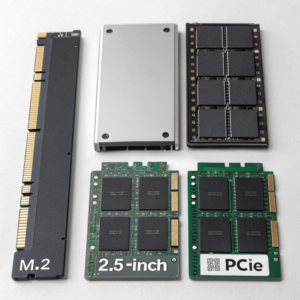
Form factor represents just one dimension of SSD categorization. Interface protocols, memory technologies, and target markets create additional distinctions that affect performance, compatibility, and cost characteristics.
Primary SSD Form Factors
2.5" SATA SSDs: The most universally compatible form factor, designed as direct replacements for traditional hard drives. These measure 100mm x 69.85mm with thickness typically 7mm or 9.5mm, fitting standard drive bays in laptops and desktops.
M.2 SSDs: Available in multiple lengths (2230, 2242, 2260, 2280, 22110) to accommodate different capacity and performance requirements. The 2280 size (22mm wide, 80mm long) has become the standard for consumer applications.
mSATA SSDs: Compact drives measuring 50.95mm x 30mm, commonly found in laptops, tablets, and industrial applications where space constraints are critical.
Enterprise Form Factors: U.2 (2.5" with specialized connector), U.3 (next-generation enterprise), and the newer EDSFF family designed specifically for data center density optimization.
Interface Protocol Classifications
SATA SSDs: Use the Serial ATA interface with maximum theoretical bandwidth of 6 Gb/s (approximately 550 MB/s real-world). Compatible with virtually all computers but limited by interface speed.
NVMe SSDs: Utilize PCIe lanes directly, bypassing SATA limitations. PCIe 3.0 x4 provides up to 32 Gb/s bandwidth, while PCIe 4.0 x4 doubles that to 64 Gb/s.
NVMe-oF: Network-attached storage using NVMe over Fabrics protocols for enterprise applications requiring shared high-performance storage.
Memory Technology Types
SLC (Single-Level Cell): Stores one bit per cell, offering highest performance and endurance but at premium cost. Primarily used in enterprise and industrial applications.
MLC (Multi-Level Cell): Stores two bits per cell, balancing performance, endurance, and cost for professional applications.
TLC (Triple-Level Cell): Stores three bits per cell, providing good performance at consumer-friendly pricing. Most mainstream SSDs use TLC technology.
QLC (Quad-Level Cell): Stores four bits per cell, maximizing capacity and minimizing cost but with reduced performance and endurance compared to other types.
The EDSFF (Enterprise and Data Center SSD Form Factor) family represents the newest category, designed specifically for data center applications. These include ruler form factors (E1.L, E3.L) and more compact designs (E1.S, E3.S) that optimize storage density in server environments.
Specialized variants also exist for specific applications. Specialized variants also exist for specific applications. Industrial SSDs feature extended temperature ranges7 and enhanced reliability
-
Learn about the significance of extended temperature ranges in SSDs and how they enhance durability and functionality in various environments.
feature extended temperature ranges and enhanced reliability. Gaming SSDs incorporate RGB lighting and heat spreaders. External SSDs package internal technology in portable enclosures with USB or Thunderbolt connectivity.Conclusion
Solid state drives encompass diverse technologies and form factors, all united by flash memory storage that delivers superior performance, reliability, and efficiency compared to mechanical alternatives. ↩ ↩ ↩
