
After years of helping clients upgrade their systems for demanding mold design work, I’ve learned that choosing the wrong SSD can bottleneck entire workflows. The key lies in matching storage specifications to your actual computing needs rather than simply buying the cheapest or most expensive option.
When purchasing an SSD, consider capacity requirements, form factor compatibility, interface type (SATA vs NVMe), performance specifications, endurance ratings, and budget constraints to ensure optimal performance for your specific use case.
Making an informedMaking an informed SSD purchase decision requires understanding how different specifications translate into real-world performance benefits8 for your particular applications and system configuration
Choose your SSD by first checking your system’s form factor compatibility and interface support, then matching capacity and performance specifications to your workload requirements and budget constraints.

Start by identifying what your system can physically accommodate. Check whether your motherboard has M.2 slots and what PCIe generation they support, or if you need a 2.5" drive for standard SATA connections. This compatibility check prevents purchasing drives that won’t physically fit or achieve their rated performance in your system.
System Compatibility Assessment
Form Factor Requirements: Measure available space in your laptop or desktop. M.2 slots typically accept 2280 size drives, but some systems only accommodate shorter 2242 drives. For 2.5" bays, check both physical dimensions and available SATA power/data connections.
Interface Capabilities: Verify whether your system supports NVMe over PCIe for M.2 slots, or if they only provide SATA connectivity. Using an NVMe drive in a SATA-only M.2 slot either won’t work or will severely limit performance.
PCIe Generation Support: Newer PCIe 4.0 and 5.0 drives achieve their rated speeds only on compatible motherboards. They’ll work in older PCIe 3.0 slots but at reduced performance levels.
Performance and Capacity Planning
Workload Analysis: Consider your typical tasks. Basic computing needs (web browsing, document editing) require minimal performance, while video editing, CAD work, or gaming benefit significantly from high-performance NVMe drives.
Capacity Requirements: Calculate current storage usage plus growth expectations. Operating systems typically require 100-120GB, with applications adding another 500GB-1TB. Factor in project files, media libraries, and future software installations.
Budget Allocation: Determine whether spending extra for premium performance makes sense given your applications. Sometimes a larger capacity mainstream drive provides better value than a smaller high-performance model.
Quality considerations matter significantly. Reputable manufacturers like Samsung, Crucial, Western Digital, and Kingston provide better reliability and warranty support than unknown brands. Check for features like DRAM cache, which improves performance consistency, and thermal management solutions for sustained workloads.
What’s better, 1TB or 256GB SSD?
The choice between 1TB and 256GB capacity depends on your storage requirements, budget, and long-term needs. Having worked with both capacities extensively, the decision often comes down to balancing immediate affordability against future-proofing and convenience.
1TB SSDs provide better long-term value and performance consistency, while 256GB drives offer lower initial cost but may require frequent storage management and don’t perform as well when nearly full.

Beyond simple storage space, capacity affects SSD performance characteristics. Larger drives typically include more Larger drives typically include more NAND flash chips operating in parallel, improving both read and write speeds8
Over-Provisioning Benefits: Larger drives reserve more space for background operations like wear leveling and bad block management. This extra space helps maintain performance as the drive fills up and ages over typical usage periods.
Sustained Performance: When SSDs approach full capacity, performance degrades because the controller has less free space for optimization operations. 256GB drives hit this limitation much sooner than 1TB models.
Practical Usage Considerations
Operating System Requirements: Modern Windows installations consume 25-40GB, with system updates and temporary files easily reaching 100GB total. This leaves only 156GB usable space on a 256GB drive after formatting overhead.
Application Storage: Professional software suites like AutoCAD, SolidWorks, or Adobe Creative Cloud can consume 50-100GB combined. Gaming applications often require 50-150GB each for modern titles.
Project File Management: CAD projects, video files, or extensive photo libraries quickly consume remaining space on 256GB drives, forcing constant file management or external storage reliance.
The cost difference between 256GB and 1TB drives has narrowed significantly. While 256GB drives cost around $30-40, 1TB models typically range from $70-100, providing four times the capacity for roughly double the price. This improved cost-per-gigabyte ratio makes This improved cost-per-gigabyte ratio8 makes 1TB drives more economical for most users
For systems used primarily for basic computing tasks with cloud storage for documents and media, 256GB might suffice. However, for professional work, content creation, or gaming, 1TB provides much better user experience and eliminates storage anxiety.
Is m2 faster than 2.5 SSD?
M.2 and 2.5" refer to physical form factors rather than inherent speed characteristics, but M.2 drives typically offer superior performance potential through their interface advantages. Having tested numerous drives across both form factors, the performance differences are significant when properly utilized.
M.2 SSDs can be significantly faster than 2.5" SSDs when using NVMe protocol over PCIe connections, delivering up to 10x higher sequential speeds than SATA-limited 2.5" drives.
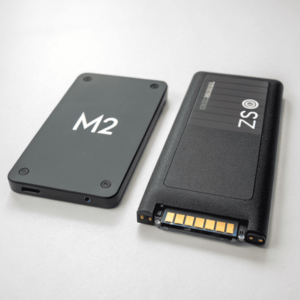
The speed advantage comes from interface differences rather than form factor alone. Most 2.5" SSDs use SATA connections limited to 6 Gb/s theoretical bandwidth (approximately 550 MB/s practical speeds). M.2 drives can use either SATA or NVMe protocols, with NVMe providing direct PCIe connectivity for much higher bandwidth.
Interface Performance Characteristics
SATA Limitations: Both 2.5" and M.2 SATA drives share identical 6 Gb/s bandwidth restrictions. A 2.5" Samsung 870 EVO and M.2 Samsung 980 SATA perform similarly, with the M.2 version offering only convenience advantages through direct motherboard mounting.
NVMe Advantages: M.2 NVMe drives bypass SATA bottlenecks entirely, connecting directly through PCIe lanes. PCIe 3.0 x4 provides 32 Gb/s bandwidth, while PCIe 4.0 x4 offers 64 Gb/s – dramatically exceeding SATA capabilities.
Real-World Performance: High-end M.2 NVMe drives achieve 7,000+ MB/s sequential reads compared to 550 MB/s maximum for SATA drives. Random I/O operations show even more dramatic improvements, with NVMe drives delivering 500,000+ IOPS versus 100,000 IOPS for SATA models.
Practical Performance Benefits
Boot and Application Loading: NVMe M.2 drives reduce Windows boot times to 10-15 seconds compared to 20-30 seconds for SATA drives. Large application launches show similar improvements, with complex software like CAD programs starting notably faster.
File Transfer Operations: Moving large files between NVMe drives or from high-speed external storage achieves speeds 5-10x faster than SATA limitations allow. This dramatically improves workflow efficiency for media editing or large dataset management.
System Responsiveness: The low latency characteristics of NVMe protocol create more responsive systems overall, with reduced delays when switching between applications or accessing numerous small files simultaneously.
However, this performance advantage requires compatible hardware. Older systems may only provide M.2 slots with SATA connectivity, eliminating the NVMe speed benefits. Additionally, for basic computing tasks like web browsing or document editing, the performance difference between SATA and NVMe becomes less noticeable in daily use.
Installation considerations also differ. 2.5" drives require SATA data and power cables, while M.2 drives mount directly to motherboards with a single screw. This makes M.2 installation cleaner and eliminates cable management concerns, particularly valuable in compact laptop designs.
For systems that support NVMe, M.2 drives provide superior performance and installation convenience. For older systems limited to SATA connectivity, 2.5" drives often offer better value since M.2 SATA models typically cost more without delivering additional performance benefits.
Conclusion
Successful SSD purchasing requires balancing system compatibility, performance needs, capacity requirements, and budget constraints to select drives that deliver optimal value for your specific applications.
