
We’ve all been there. You accidentally delete that important file or format your drive, and suddenly panic sets in. But here’s what really matters: can you get your data back?
The short answer is maybe, but it’s significantly harder with SSDs than traditional hard drives. Unlike mechanical drives where deleted files often remain recoverable for extended periods, SSDs use TRIM commands that can permanently erase data within seconds of deletion. [1][3]

I’ve been helping people with storage solutions for years, and I can tell you that understanding SSD data recovery is crucial for anyone working with and I can tell you that understanding SSD data recovery31 is crucial for anyone working with modern computers
Yes, it’s possible to recover deleted data from SSDs, but success depends heavily on timing and whether TRIM is enabled. If TRIM is disabled and little time has passed since deletion, recovery software can often retrieve your files successfully. [1][2]
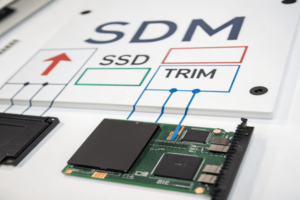
The TRIM Command Challenge
The biggest hurdle comes from something called TRIM. ThisThis ATA command was introduced in Windows 7 to optimize SSD performance31
Here’s what makes this different from mechanical drives:
| Storage Type | Deletion Process | Recovery Window |
|---|---|---|
| Mechanical HDD | Marks space as available, data remains | Weeks to months |
| SSD with TRIM | Immediately erases data blocks | Minutes to hours |
| SSD without TRIM | Similar to HDD behavior | Days to weeks |
I remember working with a client who lost critical design files from their SSD. Because TRIM was enabled and they had continued using the drive, the data was completely unrecoverable. This taught me the importance of immediate action when dealing with SSD data loss.
The key factor is time. If you act quickly after deletion and avoid writing new data to the drive, your chances improve significantly. But if TRIM has done its job, even professional recovery services may not help [3].
How to make data unrecoverable in SSD?
Sometimes you want the opposite – to ensure data can never be recovered. This is crucial when disposing of drives or handling sensitive information.
To make SSD data truly unrecoverable, use secure erase commands, professional data wiping software with DoD standards, or physical destruction. Standard deletion and formatting are insufficient for permanent data removal. [4][5]
Method 1: Manufacturer Secure Erase Tools
Most SSD manufacturers provide specialized tools for secure erasure:
- Samsung Magician for Samsung SSDs
- Kingston SSD Manager for Kingston drives
- Intel SSD Toolbox for Intel SSDs
- WD Dashboard for Western Digital SSDs
These tools use built-in ATA Secure Erase commands that reset the drive to factory condition [4]. I always recommend checking your SSD manufacturer’s website first, as these tools are specifically designed for your hardware.
Method 2: Professional Data Wiping Software
For universal compatibility, professional software like iReaShare Data Wipe or Coolmuster Data Erasure offers comprehensive solutions [4][8]. These programs:
- Support all SSD brands and models
- Use DoD 5220.22-M(E) standards for military-grade erasure
- Provide both quick and deep erase options
- Generate certificates of data destruction
Method 3: Physical Destruction
When absolute security is required, physical destruction remains the ultimate solution. This involves drilling through memory chips, crushing the drive, or professional shredding services [4][8].
From my experience helping companies dispose ofFrom my experience helping companies dispose of sensitive data31
SSD data recovery is significantly more difficult than HDD recovery due to TRIM commands, wear leveling algorithms, garbage collection processes, and hardware encryption. Success rates are much lower, especially after extended use following data loss. [3][7][10]
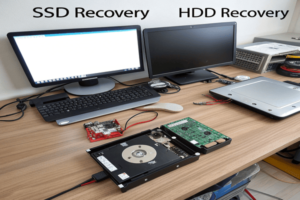
Technical Barriers to Recovery
Several factors make SSD recovery particularly challenging:
Wear Leveling: SSDs distribute data across memory cells to prevent premature failure. This means your file might be scattered across multiple physical locations, making reconstruction difficult [3].
Garbage Collection: SSDs automatically reorganize data in the background, potentially overwriting deleted files during this process [3].
Hardware Encryption: Many modern SSDs encrypt data at the hardware level. Without proper decryption keys, recovered data remains inaccessible [9].
Page-Based Storage: Unlike HDDs that store data in continuous sectors, SSDs use page-based storage. This fragmented approach requires precise identification of data pages for successful recovery [11].
Recovery Success Factors
Based on my experience with various recovery scenarios, success depends on several critical factors:
| Factor | Impact on Recovery |
|---|---|
| Time since deletion | Critical – minutes matter with TRIM enabled |
| TRIM status | Enabled = much lower success rate |
| Drive usage after loss | Any new data significantly reduces chances |
| Data type and size | Smaller files often fare better |
| Professional vs. consumer tools | Professional tools show higher success rates |
I’ve observed that consumer-grade recovery software works best within the first few hours after deletion, assuming TRIM is disabled [1][7]. After that window closes, professional services become necessary, though success rates drop considerably.
The reality I’ve learned from working with countless recovery cases is that prevention through regular backups remains far more reliable than attempting recovery after the fact. Modern SSDs prioritize performance and security over data recovery possibilities, making proactive data protection essential for anyone working with critical information.
Conclusion
SSD data recovery is possible but challenging, requiring immediate action and proper techniques for success.
-
Learning how to properly dispose of sensitive data can help ensure compliance with regulations and safeguard your business’s reputation.
, physical destruction is often the only method that meets compliance requirements for highly classified information.How hard is it to recover data from SSD?
The difficulty of SSD data recovery has increased dramatically compared to traditional drives, creating new challenges for both users and professionals. ↩ ↩ ↩
