
Are you overwhelmed by the countless SSD options for gaming and unsure which one actually gives you the best performance? Let’s break down the key choices to keep your gaming fast, smooth, and futureproof.
Which SSD is best for gaming?
When it comes to the best SSD for gaming in 2025, the leading picks are When it comes to the best SSD for gaming in 2025, the leading picks are PCIe Gen4 and Gen5 NVMe drives from top brands such as Samsung, Western Digital (WD), and Crucial. The Samsung 990 Pro41, WD Black SN850X
These Gen4 and Gen5 NVMe SSDs far outpace older SATA drives. For example, the WD Black SN7100 and Samsung 990 Pro can hit real-world sequential reads near 7,400MB/s, with rock-solid random 4K performance–which is critical for fast game loads and asset streaming[1][2][4][5][8][13][14]. Budget picks like the Biwin Black Opal NV7400 or TeamGroup MP44 also offer great speed for less money[8][13]. SATA options such as the Crucial MX500 are still good for secondary storage or older PCs[1][2][5][8][13], but they’re much slower.
Ultimately, for most gaming PCs today, Ultimately, for most gaming PCs today, Gen4 NVMe drives are the sweet spot—offering superb speeds, smooth gameplay, and pricing that’s much more accessible than Gen5 models41
SSDs use flash memory with no moving parts, resulting in much higher bandwidth and reliability. For gamers, faster random reads and lower latencies remove waiting for game levels to load, make open-world streaming seamless, and speed up system boots[6][7][8][9][10]. While switching to an SSD won’t increase your FPS directly, it will make the whole experience feel snappier and minimize hitches in games that stream assets from storage[6][7][10][12]. Advanced features like DirectStorage in Windows 11 and next-gen consoles utilize NVMe SSDs to further reduce delays and allow for richer, larger worlds[7][10].
What SSD size is best for gaming?
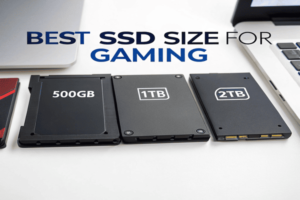
With blockbuster games commonly exceeding 100GB each, and Windows or console OS taking up significant room, the best SSD size for gaming is 1TB at minimum. For many modern gamers, 2TB is actually the sweet spot, with 4TB+ being ideal for enthusiasts with large libraries[1][2][4][5][8][10][11][12][13][14].
A 1TB SSD allows you to install your OS and several large games without constant deleting and reinstalling. However, in practice, this space can be quickly filled by just a few AAA titles and regular updates. A 2TB SSD gives you extra headroom to store frequently played games, indie titles, media, and future game releases[1][2][4][5][8][11][12][13][14]. Going up to 4TB or even 8TB becomes practical as SSD prices continue to fall and as game installs grow. If budget is a concern, start with 1TB and add another SSD as you need more storage—most motherboards now offer multiple M.2 slots[8][12][13].
Here’s a helpful chart based on different gamer types and their storage needs[1][2][4][12]:
| User Type | Minimum SSD Size | Recommended SSD Size | Comments |
|---|---|---|---|
| Casual gamer | 500GB–1TB | 1TB | For only a few games and the OS[8][12][11] |
| Regular gamer | 1TB | 2TB | Best balance for most active players[1][2][4][8][11][12] |
| Enthusiast/streamer | 2TB | 4TB+ | For large libraries, media, recording, and rapid-growth game file sizes |
| Pro/content creator | 4TB+ | 8TB | Max room for editing, recordings, and dozens of big installs |
Keep in mind, it’s easy to fill even a 1TB drive—Call of Duty: MW, Baldur’s Gate 3, or Cyberpunk 2077 each can require Keep in mind, it’s easy to fill even a 1TB drive41—Call of Duty: MW, Baldur’s Gate 3, or Cyberpunk 2077 each can require over 100GB
-
Explore this link to learn effective strategies for optimizing your 1TB drive storage, ensuring you can fit all your favorite games.
[12]. For maximum performance, aim to keep your primary SSD under 80–90% capacity so speeds don’t drop[12].Conclusion
In 2025, the best SSDs for gaming are NVMe Gen4 and Gen5 drives from brands like Samsung and WD, ideally sized at 2TB or more for modern game libraries[1][2][4][5][8][10][11][12][13][14]. SSDs bring quality-of-life boosts with much faster load times and a smoother gaming experience—don’t compromise by using a slow drive. ↩ ↩ ↩
