
SSDs cut load times, stutter, and waiting, letting you jump into your favorite games faster. If your storage can’t keep up, you’ll notice frustration every time you launch a game.
The best SSD for gaming now is a fastThe best SSD for gaming now is a fast NVMe PCIe 4.0 drive such as the WD Black SN7100 or Samsung 990 Pro. For most, 1TB or 2TB43 is the ideal size to balance performance, price, and enough room for today’s huge game installs
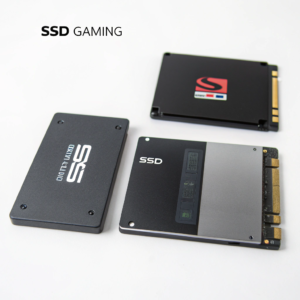
If you want to upgrade, understanding the type, the best model, and the right size pays off every day you use your PC. Don’t waste money or run out of space—read on for direct, practical SSD advice for gaming in 2025.
Which type of SSD is better for gaming?
Not all SSDs are equal for gaming. The main choices are SATA SSDs, M.2 SATA SSDs, and M.2 NVMe SSDs. Each type offers a different level of performance and installation method [13][1][6][14].
For gaming, NVMe PCIe SSDs (especially Gen 4.0) are better than SATA SSDs because they offer much higher speeds, far lower load times, and smoother gameplay. SATA SSDs are only an option if your device doesn’t support NVMe [1][6][9][14].
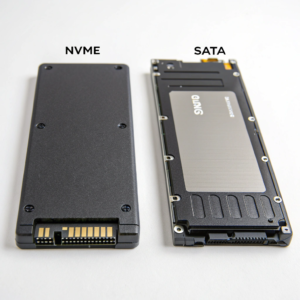
Types of SSDs and Gaming Impact
| Type | Max Speed (Read) | Typical Form Factor | Best For | Gaming Advantage |
|---|---|---|---|---|
| SATA (2.5”) | 550 MB/s | 2.5” Drive | Old builds | Faster than HDD, but much slower load |
| M.2 SATA | 550 MB/s | M.2 Card | Thin laptops | Small size, but speed like SATA above |
| NVMe PCIe 3.0 | ~3,500 MB/s | M.2 2280 | Cheap upgrades | Great value, solid load times |
| NVMe PCIe 4.0 | ~7,400 MB/s | M.2 2280 | Modern PCs | Top value, near-instant loads |
| NVMe PCIe 5.0 | ~14,000 MB/s | M.2 2280 | Enthusiasts | Future proof, minimal real-world gain |
PCIe 4.0 NVMe drives are an easy recommendation. They combine performance (load the largest games in seconds), price, and compatibility. You only need PCIe 5.0 if you demand the absolute fastest synthetic speeds, though even then, the in-game boost is hardly different from PCIe 4.0 [1][6][8][9][13][14].
PCIe 4.0 drives such as the WD Black PCIe 4.0 drives such as the WD Black SN850X and Samsung 990 Pro43 set the standard for balancing cost and performance
Top Gaming SSDs (2025 Mainstream Picks)
| SSD Model | Interface | Sequential Speed | Key Features | Gaming Performance |
|---|---|---|---|---|
| WD Black SN7100 | PCIe 4.0 NVMe | 7,250/6,900 MB/s | Best overall; great random read | Fast load, efficient [1][14] |
| Samsung 990 Pro | PCIe 4.0 NVMe | 7,450/6,900 MB/s | Cool, consistent, top support | Best for high-end builds [6][9][10] |
| WD Black SN850X | PCIe 4.0 NVMe | 7,300/6,600 MB/s | Heatsink option, big cache | Top-tier all-around [1][6][9][10] |
| Crucial T500 | PCIe 4.0 NVMe | 7,400/7,000 MB/s | DRAM cache, power-efficient | Faster than older Gen 4, laptop pick [6][9][14] |
| WD Black SN8100 | PCIe 5.0 NVMe | 14,900/14,000 MB/s | Fastest yet, reasonable heat | For pure speed, but overkill [1][6][9][14][5] |
All these SSDs have random IOPS that mean game assets load very quickly, and load screens are nearly gone in new titles [1][6][9][10][14]. PCIe 5.0 SSDs like the SN8100 or Crucial T705 are technically faster but come at a steep price and don’t improve actual game loads by as much as the marketing would have you believe [1][6][5][14]. For the best price-to-performance, stick with a good Gen 4 NVMe [1][6][9][10][14].
For budget buyers, options like the Biwin Black Opal NV7400, Team Group MP44, and WD Blue SN5000 deliver strong gaming performance at a much lower price [1][8][5][14].
What SSD size is best for gaming?
Game files keep getting larger. With new AAA games often requiring Game files keep getting larger. With new AAA games43 often requiring 100GB or more each, and the OS plus updates eating up additional space
Recommended SSD Sizes for Gaming (2025)
| SSD Size | Usable for… | Recommended For | Why It Matters |
|---|---|---|---|
| 256GB | Very basic use | Office, backup drive | Running out of space quickly [12][13] |
| 512GB | Light gaming (indies) | Budget/light users, secondary drive | Only 3-5 AAA titles, little room [1][6][12][13] |
| 1TB | Mainstream AAA gaming | Entry-level/standard setups | OS, 6-8 big games, some headroom [1][6][9][11][12][13][14] |
| 2TB | Heavy gaming, large library | Enthusiasts, most future-proof | OS + 12–20 big games, no juggling [1][6][9][11][12][13][14] |
| 4TB+ | Huge libraries, content creation | Streamers, data hoarders, backup | For storing everything, not just games |
A 1TB SSD gives you a comfortable base for a gaming rig, but if you like having lots of big games installed or you also do content creation, I recommend 2TB as a new sweet spot for modern systems [1][6][9][12][13][14]. If you go 512GB, you’ll end up deleting games all the time, and 256GB is only for light use or a secondary drive now [12][13][14].
Actual use cases:
- Call of Duty Warzone: 125GB
- Baldur’s Gate 3: 150GB
- Cyberpunk 2077: 70GB
- GTA V: 72GB [13]
Add up a few of these and you hit 500GB in no time. Always allow 10–20% free space for SSD health and performance [12]. For most people who don’t want to constantly juggle what’s installed, 2TB is a relaxing choice [1][6][9][12][13][14].
Conclusion
Go for a PCIe 4.0 NVMe SSD like the WD Black SN7100 or Samsung 990 Pro. Choose 1TB at the minimum, 2TB for serious gaming. Avoid slower SATA models unless you have no NVMe slots.
