

When hardware sourcing teams evaluate new compute infra […]
When hardware sourcing teams evaluate new compute infrastructure, asking whether or how a server has RAM is often the starting point for critical architecture decisions. Sourcing mistakes happen when buyers assume standard memory works in commercial nodes, leading to silent data corruption, unbootable chassis, and costly procurement delays. Understanding how server memory functions ensures your organization selects resilient hardware that safeguards operational uptime.
Yes, every functional server must have RAM (Random Access Memory) to operate, but enterprise platforms use specialized ECC (Error-Correcting Code) registered memory rather than consumer-grade modules. A server relies on volatile system memory to hold operating system kernels, application threads, and database tables for immediate CPU execution, preventing catastrophic system crashes and data loss.
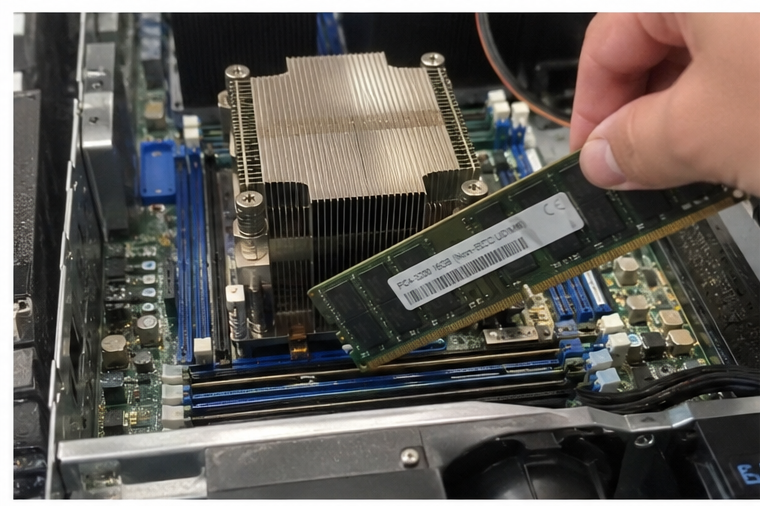
While the simple operational answer is always affirmative, the commercial reality of memory selection involves complex hardware tiers, procurement models, and architecture rules. Let us explore how enterprise memory diverges from desktop modules, how factory delivery states impact your bill of materials, and how to size modules accurately for demanding compute workloads.
Why does a server have RAM with ECC error correction?
Deploying computing nodes in zero-downtime production environments exposes hardware to electrical noise and cosmic ray particle strikes that flip individual memory bits[^1]. Standard memory crashes when these flips occur, disrupting transactions and corrupting databases. Enterprise hardware prevents this failure mode by pairing server processors with error-checking dynamic storage architectures.
A server utilizes RAM equipped with ECC technology to actively detect and correct single-bit memory errors in real time during high-throughput execution. By maintaining parity check bits and specialized memory registers, server memory stops silent data corruption, protects hypervisor integrity, and maintains continuous system availability under sustained 24/7 compute loads.
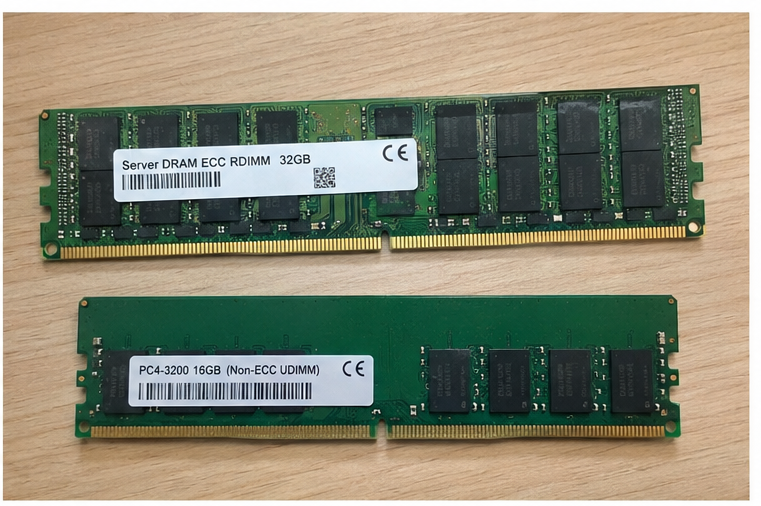
The Structural Differences Between Consumer and Enterprise Modules
During pre-sales consultations with systems integrators, I often encounter teams wondering why they cannot populate rackmount nodes with lower-cost client unbuffered memory (UDIMMs). The restriction stems from physical enterprise design standards rather than artificial market segmentation:
- Error-Correcting Code (ECC): Standard memory stores data in 8-bit bytes. Enterprise server memory adds an extra check bit for every 64 bits of data.[^2] The integrated memory controller uses this parity information to compute checksums, correcting single-bit flips on the fly and alerting the system administrator if multi-bit errors emerge.
- Registers and Buffers (RDIMMs and LRDIMMs): Registered DIMMs position a hardware buffer between the memory modules and the central processor's memory controller.[^3] This design reduces electrical loading on the memory bus. It allows system motherboards to support 16 to 32 discrete slots across dual CPU sockets without degrading bus signal stability.
- Thermal Sensors and Heat Spreaders: Enterprise server nodes move massive air volumes across high-density chassis. Industrial memory includes robust thermal monitoring ICs and thick heat spreaders to prevent localized throttling under continuous compute stress.
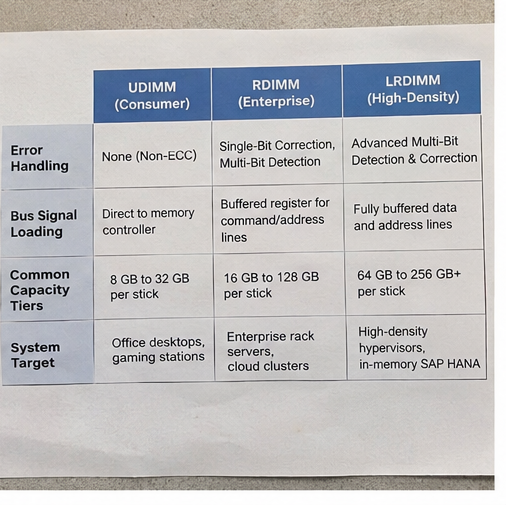
| Memory Feature | Consumer Desktop Memory (UDIMM) | Enterprise Server Memory (RDIMM) | High-Density Enterprise Memory (LRDIMM) |
|---|---|---|---|
| Error Handling | None (Non-ECC) | Single-Bit Correction, Multi-Bit Detection | Advanced Multi-Bit Detection & Correction |
| Bus Signal Loading | Direct to memory controller | Buffered register for command/address lines | Fully buffered data and address lines |
| Common Capacity Tiers | 8 GB to 32 GB per stick | 16 GB to 128 GB per stick | 64 GB to 256 GB+ per stick |
| System Target | Office desktops, gaming stations | Enterprise rack servers, cloud clusters | High-density hypervisors, in-memory SAP HANA |
Operational Risk and Commercial Impact
I regularly remind procurement officers that omitting registered ECC memory converts software bugs into hardware outages. When single-bit corruption strikes financial ledgers or medical image rendering buffers, the financial repercussions far exceed the marginal price premium of certified enterprise modules.
Does a server have RAM pre-installed in barebones procurement?
Purchasing teams often order server platforms expecting operational units, only to receive non-functional chassis packages that lack populated memory banks. This confusion originates from mismatched contract language between barebones manufacturing platforms and turnkey deployments. Resolving this discrepancy early saves weeks of schedule slippage.
A server does not have RAM pre-installed when purchased as a barebones platform, which includes only the chassis, motherboard, cooling, and power distribution systems. Conversely, fully integrated turnkey servers ship with tested, pre-populated memory modules matched precisely to the processor configuration, intended workload, and client software requirements.
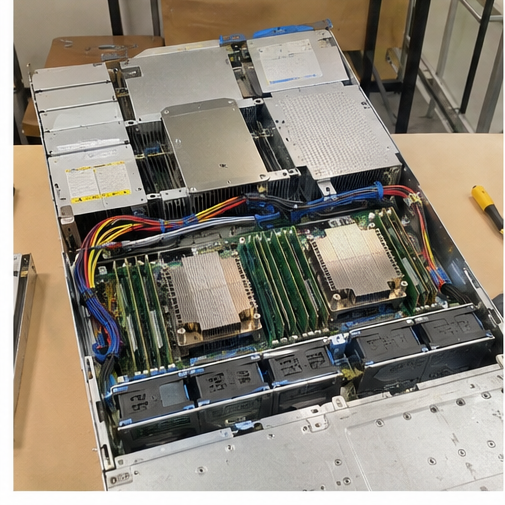
Distinguishing Barebones Platforms from Turnkey Deliveries
In our OEM/ODM manufacturing facility, we ship hardware under two primary commercial arrangements, depending on how our distributor or integrator partners manage their supply chains:
- Barebones Server Platforms (L6 Integration)[^4]: These systems consist of validated industrial sheet metal, backplanes, redundant power supplies (PSUs), thermal fan arrays, and factory motherboards. The system integrator procures and installs CPUs, RAM, and boot drives locally to retain inventory flexibility and manage volatile semiconductor component pricing.
- Turnkey Production Servers (L10/L11 Integration): These appliances arrive fully populated, cabled, firmware-flashed, and burn-in tested. The manufacturer installs validated RAM modules into balanced channels, verifies multi-day stress loads, and pre-installs customer hypervisors or storage stacks before packaging.
Procurement Rule: Always inspect the bill of materials (BOM) for "L6" versus "L10/L11" designations. If your order document designates an L6 build, your integration facility must supply and install compatible server RAM separately.
Avoiding Supply Chain and Sourcing Mismatches
When sourcing components through independent channels, integration teams risk acquiring modules with mismatched speeds, unsupported ranks, or conflicting timings. Procuring verified turnkey nodes shifts module validation, memory-bus speed matching, and single-source warranty accountability directly to your manufacturing partner.
How does server RAM allocation dictate workload scalability?
Systems operators frequently overspend on flagship multi-core processors while starving compute channels of balanced memory density. A server with high core counts and anemic or misconfigured RAM will suffer severe CPU wait-state bottlenecks. Understanding memory topology transforms server capacity from an operational guess into an exact engineering science.
Server RAM directly determines system scalability by dictating maximum virtual machine density, database working sets, and CPU thread throughput. Suboptimal memory allocation throttles processor performance, limits container density, and forces hypervisors into disk-swapping cycles that degrade latency across your entire enterprise infrastructure.

Memory Channel Rules and Balanced Population Topologies
Modern server architectures from Intel (Xeon Scalable) and AMD (EPYC) do not address memory through simple dual-channel buses. Modern processors feature 8-channel or 12-channel memory architectures per CPU socket.[^5]
To maximize operational throughput, procurement engineers must observe strict population rules:
- Channel Balancing: If a processor supports eight memory channels, you should install modules in multiples of eight (e.g., 8, 16, or 24 DIMMs per socket). Populating an odd number of slots, such as five sticks, forces the memory controller into an asymmetric access mode that can slash aggregate bandwidth by up to 35%[^6].
- Rank Loading Dynamics: Memory ranks refer to discrete 64-bit data blocks on a single module. Populating too many high-rank modules (such as quad-rank quad-die packages) on a single physical channel forces the system firmware to down-clock the bus frequency to preserve signal integrity[^7].
- Generational Leaps (DDR4 vs. DDR5): Sourcing new platforms requires planning around DDR5 architectures. DDR5 introduces dual 32-bit sub-channels per module, on-die power management integrated circuits (PMIC), and base data rates reaching 4800–6400 MT/s[^8], drastically outpacing legacy DDR4 nodes.
Performance Degradation in Virtualized Environments
When hosting dense hypervisor environments like VMware ESXi or Proxmox VE, memory capacity caps guest density long before CPU utilization hits 80%. If physical RAM runs out, the hypervisor swaps guest memory blocks to local solid-state drives or storage area networks (SANs). This process introduces milliseconds of read latency[^9], instantly stalling database transactions.
How much server RAM does your enterprise deployment need?
Procurement teams commonly oscillate between two extremes: over-purchasing costly memory that sits idle, or under-allocating memory and crippling production software. Sizing memory requires mapping specific software demands against hardware expansion thresholds to maximize return on hardware investment.
An enterprise server requires memory sized according to its primary functional role: network edge appliances often function well on 32 GB to 64 GB, standard virtualization hosts demand 256 GB to 512 GB, and large-scale in-memory database platforms regularly require 1 TB to 4 TB of RAM.
Workload-Driven Memory Capacity Guidelines
I consistently advise technical buyers to categorize hardware requests into distinct operational classes before locking down component specs. The breakdown below reflects real-world allocations across enterprise tiers:
- Edge Gateways & Industrial Network Appliances: These nodes run localized control tasks, micro-firewalls, or lightweight telemetry collection. They thrive on 32 GB to 64 GB of memory, prioritizing low thermal output and high power efficiency over raw density.
- General Corporate Virtualization (Hypervisors): Typical virtual machine hosts run 20 to 40 corporate workloads. Operators should plan for 16 GB of base host overhead plus 8 GB to 16 GB per assigned virtual machine, making 256 GB to 512 GB the standard sweet spot.
- In-Memory Databases and High-Performance Analytics: Platforms like SAP HANA, Redis, and real-time inference pipelines store active query tables entirely within memory. These engines demand 1 TB to 4 TB of registered ECC RAM[^10], distributed across all available channels for maximum bus saturation.
Total Required RAM = OS Base Overhead + ∑(Virtual Machine Allocations) + Storage Buffer Allowance + 20% Growth HeadroomStrategic Headroom and Future Lifecycle Planning
When building server hardware with an OEM/ODM partner, leaving open DIMM slots provides cost-effective expansion paths. However, leaving slots empty must be balanced against channel symmetry.
Planning a configuration with half-populated channels (e.g., 1 DIMM per channel instead of 2 DIMMs per channel) lets you double capacity down the road without discarding existing modules, keeping long-term lifecycle costs under control.
Frequently Asked Questions
Can a server run without RAM installed?
No, an enterprise server cannot boot or run without RAM. The central processor requires high-speed volatile memory to store firmware instructions, load the operating system kernel, and process system interrupts. Without installed, functional memory modules, the motherboard management controller will report critical POST errors.
Can I mix desktop RAM with server RAM?
No, you cannot combine consumer desktop RAM and enterprise server RAM on the same motherboard. Consumer desktop modules lack the ECC parity lines and register buffers required by server board chipsets. Physical keying and electrical pin signaling prevent these two distinct module classes from coexisting.
What is the difference between RDIMM and LRDIMM?
RDIMMs (Registered DIMMs) buffer address and command lines to reduce memory bus electrical strain. LRDIMMs (Load-Reduced DIMMs) buffer both command lines and data lines. LRDIMMs allow systems to achieve significantly higher memory densities and run more physical memory ranks without forcing reductions in memory clock frequency.[^11]
What happens when an uncorrectable ECC memory error occurs?
When server memory encounters an uncorrectable multi-bit error, the hardware triggers a Machine Check Exception (MCE).[^12] To prevent corrupted data from writing to persistent storage disks, the server immediately halts operations or restarts, protecting relational databases from irrecoverable transaction damage.
Conclusion
Understanding the reality behind whether a server has RAM clarifies essential hardware requirements across your entire sourcing lifecycle. Enterprise nodes do not merely contain dynamic memory; they rely on balanced, registered, error-correcting memory architectures specifically engineered to preserve data integrity and prevent unplanned downtime. Navigating barebones chassis requirements, adhering to channel balancing guidelines, and sizing modules to your real workloads ensure long-term platform stability.
Whether you need barebones server platforms or fully integrated turnkey computing nodes, selecting the right hardware partner eliminates supply chain friction. Contact our OEM/ODM engineering team today to review your deployment specifications, verify component compatibility, and build custom enterprise hardware tailored to your infrastructure roadmap.
[^1]: "Single-event upset", https://en.wikipedia.org/wiki/Single-event_upset. Large-scale field studies, such as Schroeder et al. (SIGMETRICS 2009), establish that DRAM error rates in production clusters are heavily influenced by environmental particle strikes and memory hardware vulnerabilities. Evidence role: mechanism; source type: paper. Supports: Cosmic ray neutron flux and alpha particle radiation cause single-event upsets that flip bits in unshielded DRAM cells.. Scope note: Error rates vary substantially depending on memory manufacturing process node and altitude. [^2]: "ECC memory", https://en.wikipedia.org/wiki/ECC_memory. As defined in standard computing memory architectures, SECDED Hamming codes employ 8 syndrome bits over a 64-bit data bus to detect double-bit errors and correct single-bit flips. Evidence role: definition; source type: encyclopedia. Supports: Standard single-error correction, double-error detection (SECDED) architectures append 8 check bits to a 64-bit word to form a 72-bit bus.. [^3]: "Registered memory", https://en.wikipedia.org/wiki/Registered_memory. JEDEC memory standards detail that registering clock drivers (RCDs) isolate the command and address bus, enabling stable multi-DIMM channel configurations. Evidence role: mechanism; source type: institution. Supports: RDIMMs buffer command and address lines through a registering clock driver, reducing electrical loading on the host memory controller.. [^4]: "Server Manufacturing Levels Defined", https://www.amax.com/server-manufacturing-levels-defined/. Standard electronics manufacturing supply chain taxonomies classify an unpopulated chassis containing motherboard and power subsystems as Level 6 integration. Evidence role: definition; source type: encyclopedia. Supports: Level 6 (L6) designates a barebones compute platform containing the chassis, motherboard, thermal components, and power distribution, excluding CPU and memory.. Scope note: Subsystem inclusions between L6 and L7 can vary slightly between contract manufacturers. [^5]: "Epyc", https://en.wikipedia.org/wiki/Epyc. Architectural briefs for AMD Zen 4 EPYC and Intel Emerald Rapids/Sapphire Rapids processors confirm native support for up to 12 and 8 discrete DDR5 channels per socket respectively. Evidence role: general_support; source type: research. Supports: Recent enterprise server processor generations support 8-channel (e.g., 4th Gen Intel Xeon Scalable) and 12-channel (e.g., AMD EPYC 9004 series) memory buses.. [^6]: "Balanced Memory Configurations for 2-Socket Servers with ...", https://lenovopress.lenovo.com/lp2272-balanced-memory-configurations-for-2-socket-servers-with-intel-xeon-6. Memory optimization guidelines published by enterprise server manufacturers demonstrate that uneven channel configurations cause significant throughput throttling under memory-bound workloads. Evidence role: statistic; source type: research. Supports: Unbalanced memory configurations force controllers into asymmetric modes, causing measurable bandwidth drops of 20% to 35% compared to fully balanced channel population.. Scope note: The exact bandwidth penalty depends on memory controller scheduling and whether sub-channels or interleaved regions are accessed. [^7]: "JEDEC memory standards", https://en.wikipedia.org/wiki/JEDEC_memory_standards. JEDEC specifications and vendor hardware design guides specify lower maximum operational frequencies when operating in multi-rank, multi-DIMM-per-channel topologies. Evidence role: mechanism; source type: institution. Supports: Electrical capacitive loading from multiple ranks per channel (such as 2DPC configurations) prompts server firmware to decrease bus clock rates to maintain signal margins.. [^8]: "DDR5 SDRAM", https://en.wikipedia.org/wiki/DDR5_SDRAM. JEDEC Standard JESD79-5 outlines the architectural transition of DDR5 SDRAM to two independent sub-channels per module and integrated on-DIMM power management. Evidence role: definition; source type: institution. Supports: The JEDEC JESD79-5 specification mandates dual independent 32-bit (plus 8 ECC bits) sub-channels per DIMM, on-module PMIC voltage control, and baseline speeds starting at 4800 MT/s.. [^9]: "Memory", https://en.wikipedia.org/wiki/Memory. Computer systems engineering references (e.g., Hennessy & Patterson) highlight the Von Neumann memory hierarchy latency gap, where paging to non-volatile block devices introduces microsecond to millisecond delays. Evidence role: statistic; source type: education. Supports: Direct DRAM access exhibits latencies around 50–100 nanoseconds, whereas disk and network-attached storage swaps register in microseconds to milliseconds.. Scope note: Modern NVMe storage reduces local paging latency to microseconds, though network-based SAN swap can still approach milliseconds. [^10]: "Certified and Supported SAP HANA® Hardware Directory", https://www.sap.com/dmc/exp/2014-09-02-hana-hardware/enEN/. The SAP Certified and Supported SAP HANA Hardware Directory documents minimum production cluster nodes scaling from 768 GB to over 3 TB per multi-socket appliance. Evidence role: case_reference; source type: institution. Supports: Enterprise in-memory relational analytics suites like SAP HANA require node memory capacities commonly ranging from 512 GB to multiple terabytes for primary table residency.. Scope note: Appliance requirements scale with compression ratio and table data footprint. [^11]: "What Is LRDIMM?", https://www.oscoo.com/news/what-is-lrdimm/. JEDEC memory committee documentation identifies memory buffers on LRDIMMs as providing electrical isolation on DQ data lines, allowing systems to populate higher rank counts at full bus speeds. Evidence role: mechanism; source type: institution. Supports: LRDIMMs replace the register with an isolation memory buffer for both data and address buses, translating physical ranks into logical ranks and minimizing bus load.. Scope note: The extra buffering adds modest CAS latency compared to equivalent-speed RDIMMs. [^12]: "Machine-check exception", https://en.wikipedia.org/wiki/Machine-check_exception. Intel and AMD software developer manuals document that uncorrectable double-bit errors raise an unrecoverable Machine Check Exception (MCE) to halt system execution before corrupted cache lines are committed to storage. Evidence role: mechanism; source type: education. Supports: Hardware memory controllers signal uncorrectable errors to the CPU via the Machine Check Architecture (MCA), generating an MCE that usually induces a kernel panic..
发表回复