

Determining whether your existing hardware uses DDR3 or […]
Determining whether your existing hardware uses DDR3 or DDR4 RAM is critical when planning system upgrades or sourcing replacement inventory. Ordering the wrong generation leads to immediate installation bottlenecks, motherboard socket mismatches, and expensive project delays. Fortunately, you can identify your memory generation quickly by evaluating module labels, counting pin configurations, or checking software diagnostics.
To determine if your RAM is DDR3 or DDR4, check the label for "PC3" (DDR3) or "PC4" (DDR4), verify the notch position along the pin connector, or check Windows Task Manager under the Performance tab. Standard DDR3 modules feature 240 pins and 1.5V ratings, while DDR4 modules feature 288 pins, a curved edge connector, and 1.2V ratings.[^1]
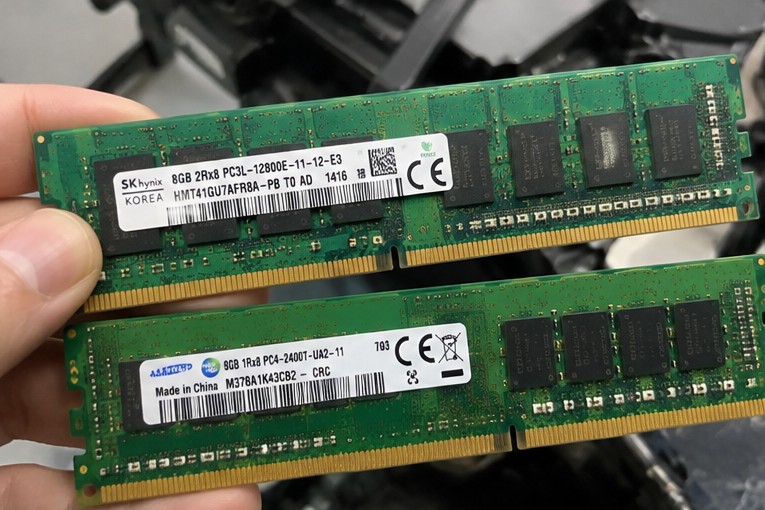
During client consultations, I often see enterprise buyers order hundreds of replacement modules based on unverified hardware assumptions. Identifying your memory architecture before placing a bulk procurement order prevents severe budget waste. Let us explore the exact physical, label, and software indicators you can use to verify your memory generation.
How can physical inspection reveal whether your RAM is DDR3 or DDR4?
Unpowered spare parts in a warehouse cannot be audited through software tools. When procurement teams receive loose server memory batches without original packaging, visual confusion often causes staging halts. Physical inspection provides an immediate, foolproof method to determine your exact memory standard without booting a machine.
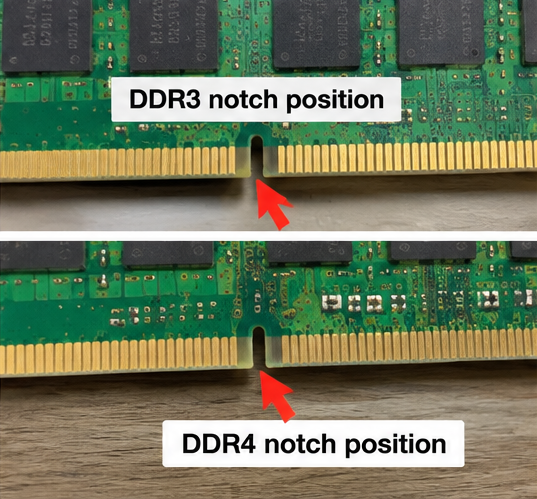
Physical inspection identifies whether a module is DDR3 or DDR4 through pin counts, connector profiles, and mechanical notch alignment. Standard desktop and server DDR3 DIMMs have 240 pins with a flat edge, whereas DDR4 DIMMs have 288 pins with a distinctly curved edge connector to reduce insertion resistance.
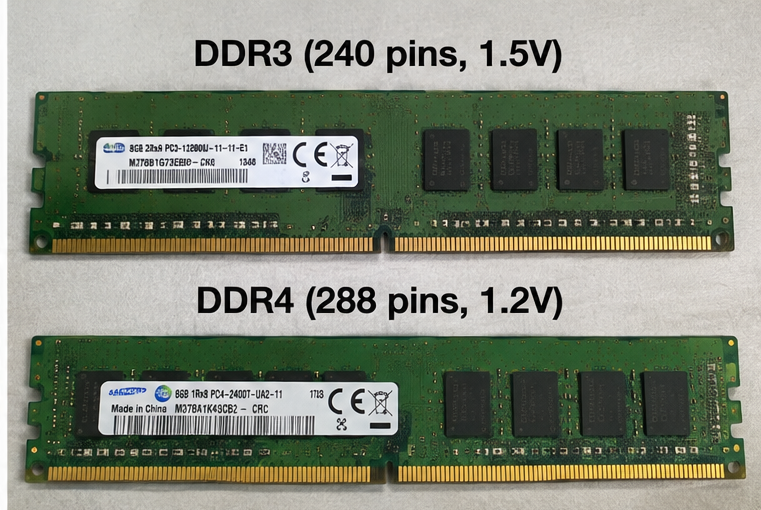
When I inspect memory sticks in our staging facility, the physical key notch is the first feature I check. Memory designers deliberately position this mechanical cutout in different locations on the connector edge. This mechanical firewall ensures that a technician cannot physically insert a DDR3 stick into a DDR4 motherboard socket, or vice versa.
Beyond notch placement, the connector profile provides immediate visual confirmation:
- Connector Edge Geometry: DDR3 modules use a completely straight edge across the gold contacts. In contrast, DDR4 modules feature a subtle convex curve along the contact pins. The center pins sit lower than the edge pins, which lowers the force required to seat the module into the socket[^2].
- Module Height and Thickness: DDR4 printed circuit boards (PCBs) are slightly thicker (1.2 mm) than DDR3 PCBs (1.0 mm)[^3]. This added thickness accommodates more signal routing layers for high-frequency data transmission.
- Pin Densities: A standard DDR3 long-DIMM packs 240 pins across its 133.35 mm width[^4]. A DDR4 long-DIMM packs 288 pins into the same physical length. The gold contacts on DDR4 are visibly narrower and spaced closer together.
Form factors also matter when evaluating laptop or compact industrial systems. Small Outline DIMMs (SO-DIMMs) display clear structural differences across both generations. DDR3 SO-DIMMs utilize 204 pins, while DDR4 SO-DIMMs utilize 260 pins.[^5]
| Form Factor Specification | DDR3 Standard | DDR4 Standard |
|---|---|---|
| Standard DIMM Pin Count | 240 pins | 288 pins |
| SO-DIMM Pin Count | 204 pins | 260 pins |
| Module Edge Profile | Flat across contacts | Curved / Convex edge |
| Standard PCB Thickness | 1.0 mm | 1.2 mm |
| Key Notch Location | Closer to center | Shifted toward one side |
Never attempt to alter a memory module to fit a mismatched socket. The mechanical notch is an engineered safety barrier designed to prevent catastrophic electrical short circuits.
How do you decode module labels to check if RAM is DDR3 or DDR4?
Inventory batches often carry cryptic vendor stickers that lack obvious retail branding. Warehouse personnel can easily overlook vital generational markers on these tags, leading to mixed bins and assembly line shutdowns. Learning how to decode standardized JEDEC labeling guarantees fast, accurate identification during incoming stock validation.
You can decode module labels by looking for the industry-standard memory designations "PC3" or "PC4." Labels marked with "PC3" denote standard DDR3 modules, "PC3L" designates low-voltage DDR3, and labels marked with "PC4" signify DDR4 modules, followed by their peak transfer bandwidth in megabytes per second.
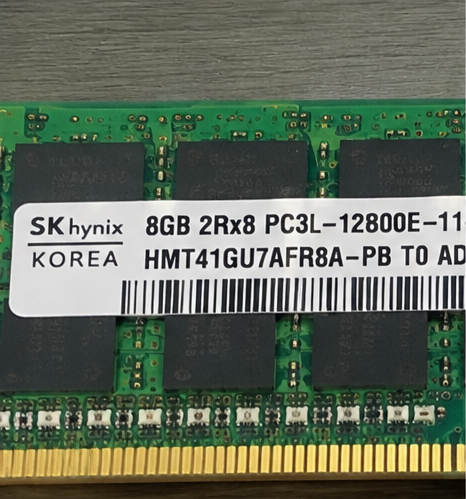
In my incoming quality inspections, manufacturer labels provide the quickest confirmation of memory architecture and electrical characteristics. Memory manufacturers follow standardized JEDEC nomenclature even when retail packaging is missing. You do not need to decipher proprietary vendor part numbers if you understand standard module classifications.
Deciphering the Standard PC3 vs. PC4 Code
Look directly at the alphanumeric string following the manufacturer logo. You will typically see a prefix such as PC3- or PC4-:
- PC3: Indicates standard DDR3 memory operating at 1.50 Volts.
- PC3L: Indicates low-voltage DDR3 operating at 1.35 Volts (backward compatible with standard DDR3)[^6].
- PC3U: Indicates ultra-low-voltage DDR3 operating at 1.25 Volts.
- PC4: Indicates standard DDR4 memory operating at 1.20 Volts.
Understanding Bandwidth and Speed Identifiers
The numbers following the generation prefix reveal the data transfer speed. Vendors display this rating either as raw clock frequency or as peak theoretical bandwidth:
- DDR3 Examples: A label reading
PC3-10600Udenotes a DDR3-1333 desktop module with 10,667 MB/s transfer bandwidth. A label readingPC3L-12800Rindicates a low-voltage DDR3-1600 registered server module capable of 12,800 MB/s. - DDR4 Examples: A label reading
PC4-19200corresponds to DDR4-2400. Common enterprise labels includePC4-21300(DDR4-2666),PC4-23400(DDR4-2933), andPC4-25600(DDR4-3200).
Label Example: 16GB 2Rx4 PC4-21300R-EE1-11
│               │   │    │         │
│               │   │    │         └── Server Registered Module (RDIMM)
│               │   │    └──────────── DDR4-2666 (21,333 MB/s Peak Bandwidth)
│               │   └───────────────── x4 DRAM Chip Organization
│               └───────────────────── Dual Rank Module
└───────────────────────────────────── Total Module Capacity
Module Type Suffixes
Pay close attention to the trailing letter on the bandwidth string. This letter defines the architectural use case of the module:
- U: Unbuffered DIMM (common in desktop client PCs).
- E: Unbuffered ECC DIMM (common in entry-level servers and workstations).
- R: Registered / Buffered ECC DIMM (standard in enterprise multi-socket servers).
- L: Load-Reduced DIMM / LRDIMM (high-capacity enterprise computing).
- S: Small Outline DIMM (used in laptops and embedded industrial appliances).
Checking these suffixes prevents integrating mismatched memory types on the same server motherboard.
How can software and BIOS identify DDR3 or DDR4 RAM in live systems?
Opening server chassis or client enclosures to inspect parts disrupts active services and consumes valuable technician time. When systems are operational, physical disassembly is an unnecessary risk. Software audits and BIOS queries allow system administrators to confirm memory generations instantly across running fleets.
Software identifies memory generations by extracting embedded Serial Presence Detect (SPD) data stored on each module. In Windows, the Performance tab in Task Manager displays the generation. In enterprise Linux or BIOS environments, administrative commands and system information screens report the exact memory technology without hardware downtime.
I frequently rely on remote diagnostics when auditing customer hardware racks prior to custom server builds. Every JEDEC-compliant module carries an EEPROM chip containing SPD data[^7]. This chip stores critical parameters including operating frequency, generation, timing profiles, and serial numbers.
Windows Diagnostic Workflows
For Windows-based installations, you can confirm memory generation using native utilities or specialized tools:
- Task Manager: Press
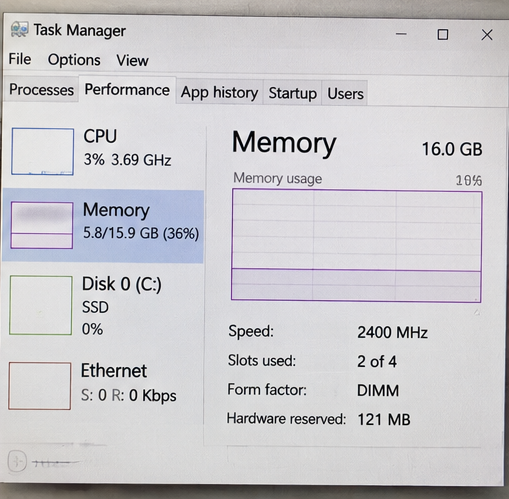
Ctrl + Shift + Esc, navigate to the Performance tab, and select Memory. The upper right corner typically displays both the total capacity and generation (for example, "16.0 GB DDR4"). Note that some virtualized instances hide this field. - Command Prompt / PowerShell: Execute
wmic memorychip get devicelocator, memorytype, speed. A return value of24indicates DDR3, whereas26designates DDR4[^8]. - CPU-Z: In professional testbenches, the free utility CPU-Z offers immediate clarity. The Memory tab reports the general type, while the SPD tab breaks down each motherboard slot individually.
Linux and Enterprise Server Audits
On production Linux servers, administrators can retrieve low-level hardware tables without a reboot using administrative terminal commands:
# Query the Desktop Management Interface (DMI) memory table
sudo dmidecode --type memory | grep -E "Size:|Type:|Speed:|Manufacturer:"
The output cleanly enumerates each installed stick:
Size: 32 GB
Type: DDR4
Speed: 2933 MT/s
Manufacturer: Micron Technology
If you manage bare-metal deployments, reboot the machine and access the UEFI or BIOS setup interface. Enterprise platforms like Dell iDRAC, HPE iLO, and Supermicro IPMI display memory generation directly within their web management consoles under the system inventory tab.
Why does mistaking DDR3 or DDR4 RAM cause critical deployment failures?
Procurement teams sometimes treat memory as a fungible commodity, assuming newer generations simply step down to legacy speeds. This misconception leads to mismatched parts, failed motherboard integration, and delayed rollout deadlines. Understanding the fundamental architectural incompatibility between DDR3 and DDR4 clarifies why generational validation is non-negotiable.
Mistaking DDR3 for DDR4 causes deployment failures because the two generations are electrically and architecturally incompatible. Motherboard chipsets and memory controllers are designed for one specific signaling standard. DDR3 operates at 1.5V with point-to-multi-drop architecture, whereas DDR4 operates at 1.2V using point-to-point signaling[^9].
I once worked with an integrator who purchased surplus enterprise DDR3 RDIMMs for a new fleet of Intel Xeon Scalable servers to save costs. The modules could not be installed because modern server processors feature integrated memory controllers designed exclusively for DDR4 or DDR5 signaling. That procurement oversight resulted in weeks of stalled deployment and costly warehouse restocking fees.
+-----------------------------------+-----------------------------------+
|       DDR3 System Interface       |       DDR4 System Interface       |
+-----------------------------------+-----------------------------------+
| • 1.50V / 1.35V Base Voltage      | • 1.20V Base Voltage              |
| • Multi-Drop Bus Topology         | • Point-to-Point Architecture     |
| • Up to 2133 MT/s Speeds          | • 2133 to 3200+ MT/s Speeds       |
| • 240-Pin Mechanical Interface    | • 288-Pin Mechanical Interface    |
| • Up to 16Gb Chip Densities       | • Up to 64Gb+ Chip Densities      |
+-----------------------------------+-----------------------------------+
The Electrical Mismatch
The primary hazard is operating voltage:
- Supply Voltage Discrepancy: Standard DDR3 memory requires 1.5V to operate reliably. Standard DDR4 functions at 1.2V, delivering roughly 20% to 40% power savings[^10] across large data center footprints.
- Controller Damage: If you were somehow able to bypass the mechanical key notch and feed DDR3 power into a DDR4-designed circuit, the excessive voltage would permanently burn the processor's integrated memory controller (IMC).
- No Passive Adapters: Passive physical adapters do not exist. Converting DDR3 signaling to DDR4 requires a dedicated bridge chipset and active voltage level translation, which introduces severe latency and destroys signal integrity.
Chipset and Processor Roadmaps
Processor generations dictate your memory path. Intel platforms transitioned completely to DDR4 starting with the Haswell-E (Core i7-5000 series) on the desktop side and Xeon E5-2600 v3/v4 on the enterprise side[^11]. AMD moved decisively to DDR4 with their original Zen architecture and Socket AM4/SP3 platforms[^12].
If your motherboard contains an older socket like LGA 1150 or Socket AM3+, it exclusively requires DDR3. Newer platforms like LGA 1151 (100 through 300 series) or LGA 3647 mandate DDR4. Auditing your installed processor model immediately tells you which memory generation your system supports.
Frequently Asked Questions
Can I put a DDR4 RAM stick into a DDR3 motherboard slot?
No, you cannot insert a DDR4 module into a DDR3 slot. DDR3 and DDR4 modules have different pin counts and completely different mechanical notch positions. These physical and electrical differences prevent cross-generation insertion and protect motherboards and memory controllers from electrical damage.
What is the main voltage difference between DDR3 and DDR4 memory?
Standard DDR3 runs at 1.5V, and low-voltage DDR3L operates at 1.35V. In comparison, standard DDR4 operates at a lower 1.2V. This voltage reduction allows DDR4 systems to consume significantly less power and generate less heat under heavy data center workloads.
How do I identify unbuffered, ECC, and registered DDR3 or DDR4 RAM?
Look at the suffix letter following the bandwidth rating on the module label. An "R" indicates registered ECC memory, an "E" denotes unbuffered ECC, an "L" marks load-reduced modules, and a "U" or missing letter signals standard unbuffered consumer RAM.
Does DDR3L work in a system designed exclusively for DDR4?
No, DDR3L does not work in DDR4 platforms. Although DDR3L operates at a lower 1.35V compared to standard DDR3, it still uses a 240-pin layout and DDR3 signaling protocols. It is physically and electrically incompatible with 288-pin DDR4 sockets.
Conclusion
Knowing whether your existing hardware relies on DDR3 or DDR4 RAM is essential for maintaining supply chain efficiency and error-free hardware upgrades. By examining the mechanical notch location, counting contact pins, deciphering standard "PC3" or "PC4" labels, or executing remote command-line tools, buyers can avoid expensive procurement blunders. Memory generations are mutually exclusive, meaning careful validation protects your infrastructure from unexpected system downtime.
If you are scaling infrastructure, upgrading legacy compute platforms, or designing custom bare-metal servers, our engineering team is here to assist. As a dedicated OEM/ODM manufacturer of enterprise server hardware, custom chassis, and data center platforms, we deliver reliable, tailor-made compute solutions built to your exact technical specifications. Contact our hardware specialists today to discuss your project requirements and streamline your production delivery.
[^1]: "DDR4 SDRAM", https://en.wikipedia.org/wiki/DDR4_SDRAM. Supported by JEDEC standard specifications JESD79-3 (DDR3 SDRAM) and JESD79-4 (DDR4 SDRAM), which define base supply voltages (1.5V and 1.2V) and physical interface layouts. Evidence role: definition; source type: institution. Supports: DDR3 and DDR4 standard DIMM pin counts, operating voltages, and electrical interface specifications established by JEDEC.. [^2]: "DDR4 SDRAM", https://en.wikipedia.org/wiki/DDR4_SDRAM. Documented in JEDEC DDR4 module design guidelines, which specify a curved edge profile to stagger pin engagement and lower overall insertion resistance. Evidence role: mechanism; source type: institution. Supports: The convex contact profile of DDR4 modules reduces peak mating force during socket insertion compared to straight edge connectors.. Scope note: Mechanical force reductions vary depending on socket contact spring design and manufacturer tolerances. [^3]: "DDR4 SDRAM", https://en.wikipedia.org/wiki/DDR4_SDRAM. Established by JEDEC MO-269 and MO-309 mechanical outline drawings, specifying nominal board thicknesses of 1.0 mm and 1.2 mm for DDR3 and DDR4 modules respectively. Evidence role: definition; source type: institution. Supports: Standard nominal PCB thickness specifications for DDR3 and DDR4 unbuffered and registered DIMMs.. [^4]: "DIMMs", https://en.wikipedia.org/wiki/DIMM. Conforms to standard JEDEC module outlines for 240-pin and 288-pin DIMMs specifying a standard overall board length of 133.35 mm (5.25 inches). Evidence role: definition; source type: institution. Supports: Standard mechanical length specification of 133.35 mm for full-size memory DIMMs.. [^5]: "JEDEC memory standards", https://en.wikipedia.org/wiki/JEDEC_memory_standards. Defined by JEDEC publication standards MO-268C (204-pin DDR3 SO-DIMM) and MO-310C (260-pin DDR4 SO-DIMM). Evidence role: definition; source type: institution. Supports: Pin assignments and form-factor definitions of DDR3 and DDR4 Small Outline DIMMs.. [^6]: "DDR3 SDRAM", https://en.wikipedia.org/wiki/DDR3_SDRAM. Confirmed by JEDEC JESD79-3-1A, which specifies DDR3L devices as dual-voltage capable at both 1.35V and 1.5V nominal operation. Evidence role: mechanism; source type: institution. Supports: DDR3L 1.35V low-voltage operation and dual-voltage backward compatibility with 1.5V DDR3 sockets.. [^7]: "Serial presence detect", https://en.wikipedia.org/wiki/Serial_presence_detect. Mandated by JEDEC Standard No. 21-C (Annex K and Annex L), requiring an onboard I2C/SMBus EEPROM containing timing, generation, and capacity descriptors. Evidence role: mechanism; source type: institution. Supports: Requirements for non-volatile EEPROM storage of Serial Presence Detect parameters on memory modules.. [^8]: "System Management BIOS", https://en.wikipedia.org/wiki/System_Management_BIOS. Defined in the Distributed Management Task Force (DMTF) SMBIOS Reference Specification (DSP0134), Section 7.18.2 'Memory Device — Memory Type'. Evidence role: definition; source type: institution. Supports: SMBIOS Type 17 Memory Device field enumeration values for DDR3 (0x18 / 24) and DDR4 (0x1A / 26).. [^9]: "DDR3 SDRAM", https://en.wikipedia.org/wiki/DDR3_SDRAM. Discussed in academic computer architecture literature evaluating DDR4 interface design, highlighting the shift toward point-to-point signaling to mitigate stub reflections at high clock rates. Evidence role: mechanism; source type: paper. Supports: The architectural transition from multi-drop bus configurations in DDR3 to point-to-point channel signaling in DDR4.. Scope note: Some high-capacity enterprise configurations implement multi-slot topologies per channel via registered buffers rather than pure direct point-to-point routing. [^10]: "LPDDR3 vs DDR4 power usage : r/hardware", https://www.reddit.com/r/hardware/comments/5dimal/lpddr3_vs_ddr4_power_usage/. Corroborated by enterprise server power benchmarking and semiconductor white papers estimating a 20% to 40% power reduction per bit transferred, primarily due to the drop from 1.5V to 1.2V and Pseudo-Open Drain logic. Evidence role: statistic; source type: research. Supports: Estimated and empirical DRAM power consumption reductions achieved by shifting from DDR3 to DDR4 voltage and signaling standards.. Scope note: Real-world operational power savings vary substantially with access density, frequency scaling, and background memory refresh overhead. [^11]: "Haswell (microarchitecture)", https://en.wikipedia.org/wiki/Haswell_(microarchitecture). Detailed in Intel Xeon Processor E5-2600 v3 Product Family Datasheets, which specify native support for registered and load-reduced DDR4 memory up to 2133 MT/s. Evidence role: historicalcontext; source type: other. Supports: Intel's commercial introduction of native DDR4 support in enterprise multi-socket server processors with the Xeon E5-2600 v3 family.. [^12]: "Zen (first generation)", https://en.wikipedia.org/wiki/Zen(first_generation). Documented in AMD architecture white papers for the first-generation Zen microarchitecture, confirming native multi-channel DDR4 memory controller integration across Socket AM4 and Socket SP3 platforms. Evidence role: historical_context; source type: other. Supports: AMD's architectural transition to DDR4 memory across consumer (AM4) and enterprise server (SP3) Zen-based processors..
发表回复