

Determining how much ram does a server need is often th […]
Determining how much ram does a server need is often the most critical question I face during initial enterprise hardware consultations. Sizing server memory improperly leads directly to severe performance failure or unrecoverable budget waste. Under-provisioning forces storage swapping that paralyzes computing tasks[^1], while over-provisioning locks up vital capital in depreciating silicon that consumes idle power.
A server needs between 16GB and several terabytes of RAM depending strictly on its workload footprint, hypervisor requirements, and user concurrency. A lightweight domain controller requires only 16GB to 32GB, standard virtualization hosts typically demand 128GB to 512GB, and large in-memory databases like SAP HANA or Redis often require 1TB or more to operate effectively[^2].
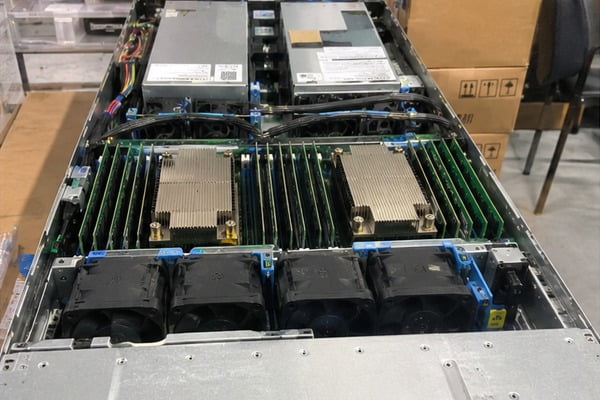
Selecting the right capacity requires looking beyond raw numbers. In commercial sizing discussions, the most common oversight we see is treating memory capacity as an isolated specification. Let us examine the technical drivers that determine your actual operational requirements.
Why does workload profile dictate how much ram does a server need?
Procurement teams frequently attempt to standardize on a single memory configuration across an entire server fleet. This one-size-fits-all approach causes either widespread service degradation or inflated capital expenditures across departments. Server memory must directly reflect the processing characteristics of the underlying software services.
The operational footprint of your deployed applications dictates how much ram does a server need far more than raw processor core counts. Transactional databases, real-time analytics platforms, and container hosts hold large data structures directly in memory to maintain throughput. In contrast, static web servers and localized network services operate with minimal active footprints.
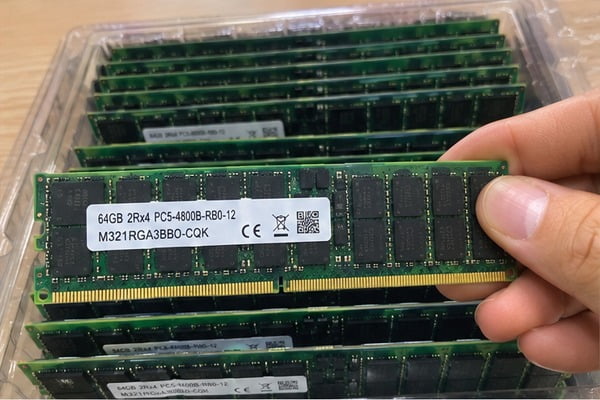
Workload Classification Framework
When clients ask me for sizing advice, I ask them to categorize their compute tasks into distinct operational tiers. Different enterprise roles handle memory allocations in fundamentally different ways:
- Infrastructure Edge & Control Planes: Active Directory, DNS, DHCP, and lightweight gateway controllers. These systems manage network requests and small routing tables. They run efficiently on modest memory allocations without holding substantial datasets in volatile storage.
- Application & Web Tiers: Microservices run across container engines like Kubernetes or Docker. Memory allocation here scales linearly with concurrent connections, session states, and thread counts.
- Relational & In-Memory Databases: Systems such as Microsoft SQL Server, PostgreSQL, Redis, and SAP HANA. Modern database engines are designed to consume all available memory to store indexes and table structures. This caching avoids slow disk read cycles.
- Virtualization Platforms (VMware ESXi, Proxmox, KVM): Hypervisors aggregate the memory demands of dozens of independent operating systems. They require deep memory pools with dedicated operating buffers.
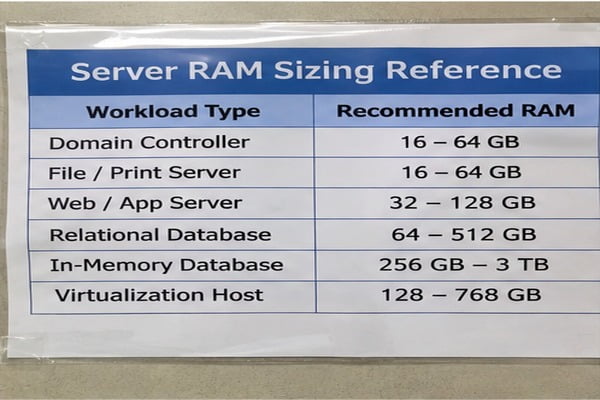
| Workload Type | Typical Starting RAM | Typical Production RAM | Primary Memory Bottleneck |
|---|---|---|---|
| Domain Controller / Active Directory | 16 GB | 32 GB – 64 GB | Service query queuing |
| Standard File / Print Server | 16 GB | 32 GB – 64 GB | Network queue buffer limits |
| Mid-Tier Web Server (1,000+ Users) | 32 GB | 64 GB – 128 GB | Concurrent session states |
| Relational Database (SQL / Oracle) | 64 GB | 256 GB – 512 GB | Index and table caching (I/O paging) |
| In-Memory Database (Redis / HANA) | 256 GB | 1 TB – 3 TB+ | Dataset sizing exceeding volatile storage |
| General Purpose Virtualization Host | 128 GB | 256 GB – 768 GB | Virtual machine density and swap exhaustion |
The High Cost of Memory Swapping
Under-sizing RAM introduces severe system-level latency. When physical memory fills up completely, the operating system shifts inactive memory pages into swap space on secondary storage drives.
Even enterprise NVMe SSD arrays with PCIe Gen 4 interfaces are orders of magnitude slower than physical DDR4 or DDR5 channels[^3]. DDR5 memory delivers transfer rates measured in nanoseconds and hundreds of gigabytes per second. NVMe storage measures access latency in microseconds.
When your server enters a heavy swap state, processor cores spend compute cycles waiting for data delivery. The server stalls, response times spike, and applications drop incoming client connections. Determining your memory footprint beforehand prevents this storage bottleneck.
What hidden memory overheads affect how much ram does a server need?
Buyers often calculate memory requirements by adding together the advertised minimum specifications of their guest applications. This approach overlooks critical system-level software that claims memory before workloads ever launch. Ignoring these hidden consumers causes system crashes during traffic spikes.
System overheads fundamentally influence how much ram does a server need to remain stable under maximum enterprise traffic. Operating system kernels, hypervisor resource reservations, storage caching algorithms, and network packet queues silently claim substantial blocks of RAM. You must incorporate these operational margins into your initial procurement planning.
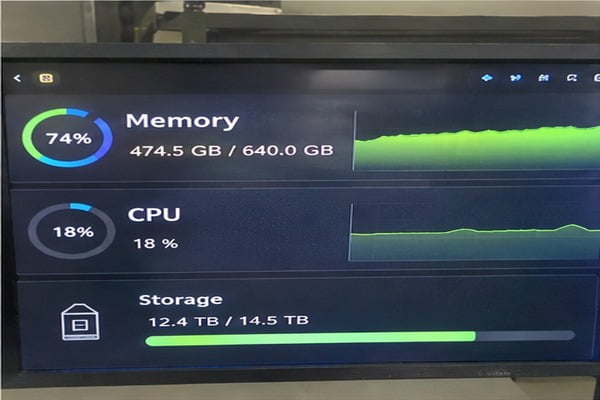
Hypervisor Memory Reservations
When sizing hardware for virtualization, system administrators cannot assign all installed memory directly to client virtual machines (VMs). Type-1 hypervisors like VMware ESXi and Proxmox VE retain a non-negotiable memory footprint to manage physical hardware drivers, CPU scheduling, and page translation tables.
A standard ESXi host consumes a baseline allocation for VMkernel processes. In addition, every active VM incurs an overhead allocation based on its assigned virtual CPUs (vCPUs) and configured memory capacity[^4].
A hypervisor host running 40 virtual machines can easily require 24GB to 48GB of RAM strictly for virtualization overhead. If you configure a physical chassis with 256GB of total RAM and allocate all 256GB across your guest VMs, the host will immediately experience resource starvation and initiate memory ballooning or swapping.
Software Caching and Storage File Systems
Modern enterprise storage architectures depend heavily on volatile system memory to maintain fast read and write operations:
- ZFS Storage Pools (ARC): The ZFS Adaptive Replacement Cache defaults to using up to 50% of total host RAM in Linux systems[^5] (and up to 90% in TrueNAS Core configurations). Under-sizing memory on a ZFS-based storage target degrades performance significantly.
- Operating System Page Caching: The Linux kernel automatically assigns unallocated memory to file system caching buffers[^6]. When free RAM is excessively constrained, these caches drop, forcing disk reads for repetitive operations.
- Hardware RAID Controllers and Write Buffers: Cache-equipped RAID controllers need matching platform memory structures to process dirty cache commits safely during uncontrolled power fluctuations.
Total Hardware RAM Needed = (Sum of All Workload Base Footprints)
                          + (Workload Concurrency Spikes [20-30%])
                          + (Hypervisor System Overhead)
                          + (Storage Caching / Buffer Pools)
In pre-sales evaluations, I routinely see engineering teams design systems without safety headroom. As a rule of thumb, always maintain a persistent 20% to 25% unallocated physical memory buffer. This headroom absorbs unpredictable transactional spikes and OS-level metadata updates without risking system stability.
How does memory channel architecture impact server performance beyond capacity?
System performance is not determined by raw capacity alone. Many procurement teams assume that a server equipped with 128GB of RAM behaves identically regardless of how those modules sit on the motherboard. This assumption ignores the physical architecture of modern enterprise processors.
Processor bus structures directly dictate memory bandwidth, and improper module placement creates severe memory bottlenecks. Modern server processors feature multi-channel architecture, requiring matching modules deployed in balanced slots across every socket. Sizing server hardware requires understanding DIMM placement just as much as aggregate memory totals.
Multi-Channel Memory Balancing
Modern server platforms rely on multi-channel memory layouts to deliver sufficient bandwidth to high-core-count processors:
- AMD EPYC Processors (Genoa/Bergamo): Feature 12-channel memory architectures per socket.
- AMD EPYC Processors (Rome/Milan): Feature 8-channel memory architectures per socket.
- Intel Xeon Scalable Processors (4th/5th Gen): Utilize 8-channel architectures per socket.
To achieve maximum performance, your memory configuration must populate every physical channel symmetrically. If a single-socket AMD processor with an 8-channel memory controller receives only two high-capacity 64GB DIMMs, the server provides the target 128GB capacity. However, it operates on only one-quarter of its available memory bus bandwidth. The processor cores will starve for data during parallel workloads.
Poor Architecture:   [DIMM 1] [DIMM 2] [Empty] [Empty] [Empty] [Empty] [Empty] [Empty]  --> 25% Bandwidth
Optimal Architecture: [DIMM]   [DIMM]   [DIMM]  [DIMM]  [DIMM]  [DIMM]  [DIMM]  [DIMM]   --> 100% Bandwidth
In commercial deployments, improperly balanced channels cause unexplained application slowdowns that software profiling cannot solve. Always balance memory across all available channels using identical capacity and speed ratings.
ECC and Module Types: Registered vs Load-Reduced
Enterprise platforms require Error-Correcting Code (ECC) modules to protect system uptime against soft memory errors caused by electrical variations and cosmic ray strikes[^7]. Non-ECC memory will cause unexpected kernel panics, leading to silent database corruption.
Beyond basic ECC validation, buyers must choose between specific module classifications:
- RDIMM (Registered DIMM): Incorporates an on-module register chip between the memory controller and the dynamic memory chips. This layout stabilizes the electrical load, enabling support for multi-DIMM configurations per channel. RDIMMs are the standard selection for mainstream enterprise servers.
- LRDIMM (Load-Reduced DIMM): Replaces the register chip with an integrated memory buffer. This design buffers both command signals and data pathways[^8]. LRDIMMs decrease the electrical load on the CPU controller, enabling higher capacities and higher module speeds when populating every slot on the board.
- 3DS RDIMM (Three-Dimensional Stacking): Packages multiple physical silicon dies vertically within individual memory chips using through-silicon via (TSV) technology[^9]. This design enables high-density deployments (such as 128GB or 256GB per module) for intensive virtualization and database nodes, though at a significantly higher initial purchase price.
How can buyers balance initial cost against expansion ceilings when deciding how much ram does a server need?
Procurement teams frequently prioritize initial purchase costs over long-term platform usability. Sizing a system strictly for Day-1 demand leaves no room for operational growth. Within twelve months, these buyers often find their memory slots fully populated, forcing an unexpected motherboard or chassis replacement to add more memory.
Calculating how much ram does a server need involves balancing initial acquisition costs against future expansion limits. Buying fewer high-density memory modules today leaves physical DIMM slots open for future scaling. However, high-density modules cost more per gigabyte, requiring careful financial and technical trade-offs during specification reviews.
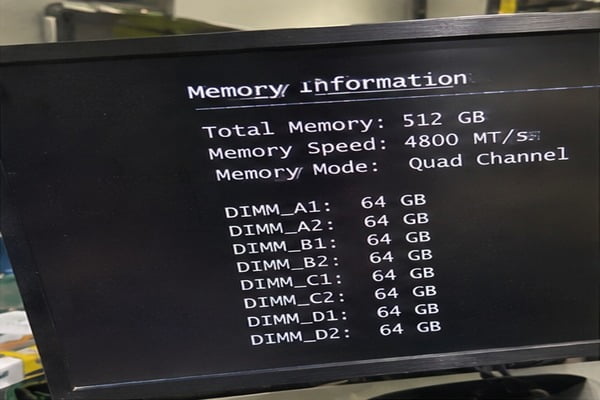
The Economics of Module Density
In B2B hardware negotiations, we often compare the cost curve between standard-density and high-density memory modules. Memory pricing scales non-linearly at the top of the density curve:
- Mainstream Modules (16GB, 32GB, 64GB DDR4/DDR5): Produced in the highest commercial volumes. These modules offer the lowest acquisition cost per gigabyte of memory capacity.
- High-Density Modules (128GB, 256GB): Produced in lower volumes using advanced die stacking. These modules carry a steep pricing premium per gigabyte.
If your technical team requires a server with 256GB of total RAM, there are several ways to configure the hardware:
- Eight 32GB DIMMs: Populates eight channels symmetrically. Delivers optimal memory bandwidth and minimizes initial purchase price. However, on an 8-slot motherboard, this option exhausts every expansion slot on Day 1. Future memory upgrades will require discarding these modules.
- Four 64GB DIMMs: Lowers initial memory bandwidth on 8-channel platforms. However, this option leaves open physical slots for expansion, allowing you to double total capacity later without retiring installed hardware.
Evaluating Thermal Load and Power Consumption
Every physical memory module draws electrical power and generates heat within the chassis. A standard DDR4 or DDR5 enterprise registered module draws between 4W and 8W under load.
A dual-socket platform equipped with 32 physical DIMM slots populated with older, high-power modules can draw upwards of 250W under sustained compute operations purely for volatile memory. This power usage translates directly into operational expenses:
- Cooling Overhead: Server fans must run at higher speeds to move air across dense DIMM arrays, increasing parasitic power use.
- Power Delivery Redundancy: Dense memory layouts require higher-wattage power supplies (PSUs) to maintain N+1 redundancy margins.
- Chassis Airflow Design: Standard rackmount chassis require structured air baffles to guide airflow across populated memory slots before reaching rear PCIe cards.
Factoring operational power costs into your initial specification prevents unexpected power consumption spikes in high-density data centers.
Frequently Asked Questions
What happens if a server runs out of RAM?
When physical RAM is completely exhausted, the operating system moves inactive memory blocks to swap storage on disk. This swapping drops system performance instantly. If swap space also fills up, the Linux Out-Of-Memory (OOM) killer or Windows kernel will terminate running processes[^10] to prevent a catastrophic operating system crash.
Can I mix different RAM capacities or speeds in a server?
You can mix different RAM capacities in some enterprise systems, but doing so drops memory channels into asynchronous modes that degrade memory bandwidth. Mixing memory speeds forces every installed module to run at the frequency of the slowest module. We advise deploying identical modules across every slot and channel to maintain hardware stability.
Why is ECC memory mandatory for enterprise servers?
ECC (Error-Correcting Code) memory detects and corrects internal memory data errors in real time. Standard consumer memory lacks error checking. Uncorrected bit-flips cause silent database corruption, file system damage, and random system crashes. Commercial server motherboards strictly require ECC registered modules for validated 24/7 data center stability.
How do I calculate RAM for a virtualization host?
To calculate virtualization RAM, sum the memory assigned to all planned virtual machines, then add a 20% to 25% safety buffer for hypervisor overhead and memory allocation spikes. In addition, account for high-availability failover buffers so surviving cluster hosts can absorb the full virtual machine load if one physical host goes offline.
Conclusion
Calculating how much ram does a server need requires an honest evaluation of real workload memory footprints, hypervisor overheads, multi-channel processor architecture, and future growth limits. Sizing hardware using arbitrary rules of thumb leads either to costly resource waste or performance-limiting storage bottlenecks. Hardware procurement decisions should balance near-term budgets with practical hardware lifecycles.
As an OEM/ODM hardware manufacturer, we help systems integrators, regional cloud providers, and data center operators design, build, and deploy balanced computing platforms tailored to explicit enterprise demands. If you are preparing your next server deployment, contact our engineering team to review your workload requirements and configure validated server platforms tailored to your business needs.
[^1]: "Thrashing (computer science)", https://en.wikipedia.org/wiki/Thrashing_(computer_science). Operating systems research defines thrashing as the state where a system spends more time servicing page faults than executing instructions, caused by insufficient physical memory relative to the aggregate working set. Evidence role: mechanism; source type: education. Supports: Virtual memory paging to disk storage leads to thrashing and dramatic drops in throughput when active working sets exceed physical memory.. [^2]: "AIR‧MS: SAP HANA In-Memory Database", https://labs.icahn.mssm.edu/minervalab/air%E2%80%A7ms-sap-hana-in-memory-database/. Surveys on in-memory database management systems highlight that enterprise deployments routinely scale past single-terabyte DRAM thresholds to maintain row/column stores without secondary storage latencies. Evidence role: general_support; source type: paper. Supports: Enterprise in-memory databases require multi-hundred gigabyte to multi-terabyte physical memory configurations to retain primary datasets, indexes, and delta stores in RAM.. Scope note: Actual memory footprint depends on dataset volume, column compression efficiency, and dynamic query workspace requirements. [^3]: "Faster than Flash: An In-Depth Study of System Challenges ...", https://arxiv.org/html/1912.06998v1. Standard computer architecture memory hierarchy models confirm that DDR channel access occurs in 50–100 nanoseconds, whereas PCIe NVMe block storage accesses require 10–100 microseconds, representing an approximately 1,000-fold difference. Evidence role: statistic; source type: education. Supports: DRAM read access latencies are on the order of tens of nanoseconds, whereas high-performance NVMe SSD latencies remain in the tens of microseconds.. [^4]: "Memory virtualization in virtualized systems: segmentation ...", https://arxiv.org/html/2006.00380v1. Analyses of Type-1 hypervisor memory management demonstrate that internal data structures, including shadow page tables or Extended Page Tables (EPT), consume host memory proportional to guest memory sizing and vCPU density. Evidence role: mechanism; source type: research. Supports: Hypervisors allocate host memory buffers for nested page tables, device emulations, and internal tracking structures proportional to guest vCPU and RAM allocations.. Scope note: Exact memory overhead percentages vary depending on the virtualization platform and hardware-assisted virtualization extensions enabled. [^5]: "Can ZFS on Linux using only half of system memory for ...", https://www.reddit.com/r/zfs/comments/12pa6gx/can_zfs_on_linux_using_only_half_of_system_memory/. Technical documentation for OpenZFS on Linux specifies that the maximum size of the Adaptive Replacement Cache (zfs_arc_max) defaults to 50% of physical memory if unconfigured. Evidence role: statistic; source type: encyclopedia. Supports: On Linux, the OpenZFS kernel module sets zfs_arc_max by default to half of the system's physical memory.. [^6]: "Page cache", https://en.wikipedia.org/wiki/Page_cache. Standard operating systems literature notes that modern UNIX-like kernels treat unused memory as a shared page cache to accelerate block I/O until user-space processes demand direct allocations. Evidence role: mechanism; source type: education. Supports: The Linux kernel automatically utilizes free memory for page caching and buffer heads, reclaiming that space dynamically when applications request memory.. [^7]: "Single-event upset", https://en.wikipedia.org/wiki/Single-event_upset. Large-scale empirical studies on DRAM reliability demonstrate that soft errors frequently stem from energetic neutron interactions and electrical fluctuations, necessitating ECC mitigation in enterprise computing. Evidence role: mechanism; source type: paper. Supports: Atmospheric neutrons originating from cosmic radiation and packaging alpha emissions cause single-event upsets (bit flips) in volatile DRAM cells.. [^8]: "Registered memory", https://en.wikipedia.org/wiki/Registered_memory. JEDEC memory standards define LRDIMMs as utilizing a memory buffer that mediates both control and data lines, presenting a single electrical load per module to enable higher bus frequencies at high socket densities. Evidence role: definition; source type: institution. Supports: Load-Reduced DIMM architecture uses an isolation memory buffer to buffer data, command, and address signals, reducing the effective electrical load on the host controller.. [^9]: "Through-silicon via", https://en.wikipedia.org/wiki/Through-silicon_via. Microelectronics packaging literature describes 3DS memory as employing through-silicon via (TSV) interconnects to stack up to eight DRAM dies above a shared base logic die, enabling ultra-high-capacity DIMMs. Evidence role: definition; source type: paper. Supports: 3DS (Three-Dimensional Stacking) memory standards define vertical integration of multiple DRAM dies connected via through-silicon vias to scale package density.. [^10]: "Out of memory", https://en.wikipedia.org/wiki/Out_of_memory. Operating system kernel documentation details that when all physical memory and swap resources are fully exhausted, the kernel invokes out-of-memory routines that select and terminate processes according to heuristic resource consumption scores. Evidence role: mechanism; source type: education. Supports: The Linux kernel invokes the OOM killer subsystem upon severe page allocation failures, evaluating heuristic badness scores to kill rogue processes and reclaim pages..
发表回复