

Many system builders wonder whether 32 GB of DDR5 is ov […]
Many system builders wonder whether 32 GB of DDR5 is overkill for modern computing platforms, struggling to balance procurement budgets against operational stability. Over-allocating memory capacity strands valuable capital that belongs in thermal management or storage, while under-allocating risks severe system bottlenecks. A disciplined evaluation of technical workloads resolves this specification dilemma.
Whether 32 GB of DDR5 is overkill depends entirely on operational concurrency, virtualization demands, and memory architecture rather than a flat threshold. While standard productivity tasks rarely saturate 16 GB, modern multi-threaded data workflows and DDR5 memory channel designs make 32 GB the optimal operational baseline for performance stability and architectural bandwidth.
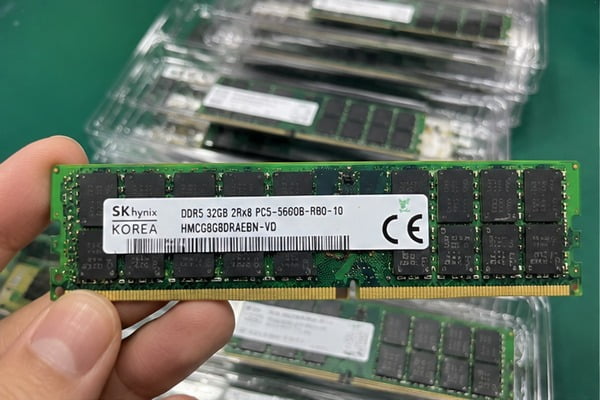
In my customer consultation work at our OEM manufacturing facility, clients regularly treat memory capacity as an isolated line item. However, DDR5 introduces unique architectural realities and procurement trade-offs. Let us examine the technical drivers, workload boundaries, and financial impacts to establish the right sizing strategy for your deployments.
Why do procurement teams ask if 32 GB of DDR5 is overkill?
Hardware procurement teams face tight margins and volatile component pricing during platform rollouts. Purchasing unneeded capacity drives up capital expenditure across hundreds of deployed nodes. Understanding the root hesitation behind memory sizing prevents costly allocation mistakes before bill-of-materials sign-off.
Procurement teams ask if 32 GB of DDR5 is overkill because traditional DDR4 baselines established 16 GB as the corporate enterprise standard. However, rising software memory footprints, browser process isolation, and changing memory module manufacturing economics have shifted system baselines, prompting buyers to question legacy capacity guidelines.
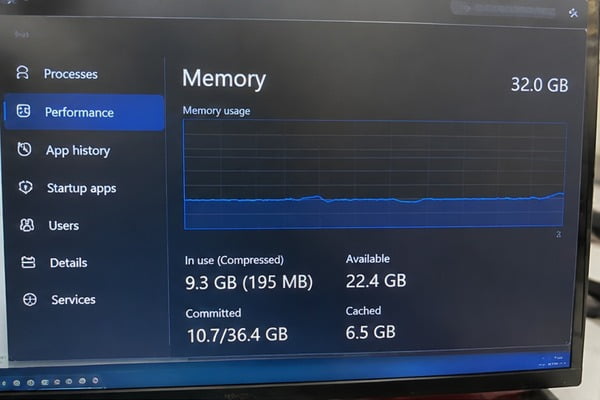
The Legacy Anchor of DDR4 Standards
For nearly a decade, system integrators treated 16 GB as the default configuration for commercial builds. During customer consultations, I often hear buyers reference their historical deployment specs from 2018 or 2020. In that era, 16 GB provided ample headroom for typical operating systems and background enterprise agents.
However, enterprise software stacks have expanded substantially:
- Operating system baselines: Modern 64-bit commercial operating systems consume between 3.5 GB and 5 GB of RAM at idle[^1] just to service baseline system routines.
- Security and monitoring agents: Endpoint Detection and Response (EDR) tools, data loss prevention agents, and automated backup software consume an additional 2 GB to 4 GB of background memory[^2].
- Browser architectures: Chromium-based browsers employ process-per-tab isolation[^3], which significantly increases memory consumption under daily enterprise multi-tasking.
When buyers calculate operational margins, they quickly realize that a 16 GB platform may leave as little as 4 GB to 6 GB of real-world addressable space for revenue-generating workloads.
| Deployment Era | Typical Base OS + Agent Footprint | Available Workload Headroom (16 GB Kit) | Headroom Degradation Risk |
|---|---|---|---|
| DDR4 Era (2018) | 2.5 GB – 3.5 GB | ~12.5 GB | Low |
| Early DDR5 (2022) | 4.0 GB – 5.5 GB | ~10.5 GB | Moderate |
| Current Enterprise | 6.0 GB – 8.5 GB | ~7.5 GB | High |
The Bill of Materials (BOM) Squeeze
In large-scale system deployments, memory cost scales linearly with node count. When a client orders five hundred rack-mounted nodes or edge appliances, upgrading from 16 GB to 32 GB represents a measurable line-item adjustment.
Procurement managers rightly challenge this delta. They must justify whether that allocated capital delivers measurable uptime and lifecycle longevity, or if it simply sits idle as unallocated silicon.
How does system architecture impact whether 32 GB of DDR5 is overkill?
Specifying system memory based solely on gigabyte count ignores critical bus physics. An incorrectly matched memory configuration can choke system throughput even if the capacity appears sufficient on paper. Evaluating channel architecture resolves the trade-off between capacity and total data throughput.
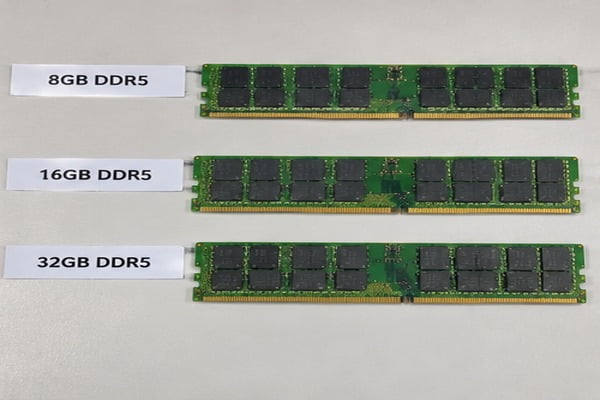
System architecture dictates that 32 GB of DDR5 is rarely overkill because DDR5 uses high-density integrated circuits. A 2x16 GB configuration utilizes dual 32-bit subchannels per DIMM and optimal bank group configurations, delivering peak memory bandwidth and signal integrity that smaller 8 GB modules cannot match.

The Technical Limitation of 8 GB DDR5 Modules
A critical detail often missed in spec sizing is memory die density. DDR5 dynamic random-access memory (DRAM) chips are manufactured natively at higher densities than prior generations, typically starting at 16 Gb (gigabits) per die[^4].
To manufacture an 8 GB DDR5 memory module, vendors must use fewer memory chips:
- Fewer bank groups: An 8 GB module often features half the memory banks of a 16 GB module, reducing bank parallelism[^5].
- Narrower access queues: The memory controller experiences higher queue delays when attempting to pipeline read and write requests across fewer chips.
- Throughput degradation: Because of these missing bank structures, an 8 GB DDR5 stick can suffer a measurable bandwidth deficit compared to a 16 GB stick running at the exact same megatransfers-per-second rating.
Therefore, selecting two 8 GB modules (16 GB total) to save money compromises the inherent architectural performance gains of the DDR5 platform.
Subchannel Topologies and Multi-DIMM Dynamics
DDR5 replaces the single 64-bit wide data bus of DDR4 with two independent 32-bit subchannels per physical DIMM[^6]. This architectural change improves bus efficiency and reduces memory access latency.
DDR4 Bus Architecture:
[ CPU Memory Controller ] <====== 64-bit Unified Bus ======> [ Single DIMM ]

DDR5 Bus Architecture:
[ CPU Memory Controller ] <--- 32-bit Subchannel A ---> [ Single DIMM (Two Subchannels) ]
                          <--- 32-bit Subchannel B --->
To take full advantage of dual-channel system architecture, you must populate two physical DIMM slots (1 DIMM per channel, or 1DPC). Populating the platform with two 16 GB modules provides 32 GB of total capacity while unlocking:
- Four concurrent 32-bit memory subchannels across the motherboard[^7].
- Full interleaving support across internal bank groups.
- Lower thermal stress per chip due to distributed die density across the heat spreaders.
In contrast, choosing a single 32 GB stick forfeits half your memory bandwidth, and choosing two 8 GB sticks limits memory controller parallelism. From an engineering perspective, a 2x16 GB (32 GB) kit represents the true sweet spot for modern platform topology.
When is 32 GB of DDR5 overkill for your specific workload?
Allocating surplus memory to low-utilization appliances drains finite hardware budgets without delivering end-user gains. Idle RAM draws quiescent power and inflates initial unit costs. Mapping memory capacity directly to functional compute profiles prevents wasteful hardware over-provisioning across your fleet.
A 32 GB DDR5 configuration is genuinely overkill for single-purpose appliances, thin clients, point-of-sale terminals, and light administrative office endpoints. These roles focus on basic web applications and document processing, where active system memory rarely exceeds 8 to 10 GB under standard business operations.
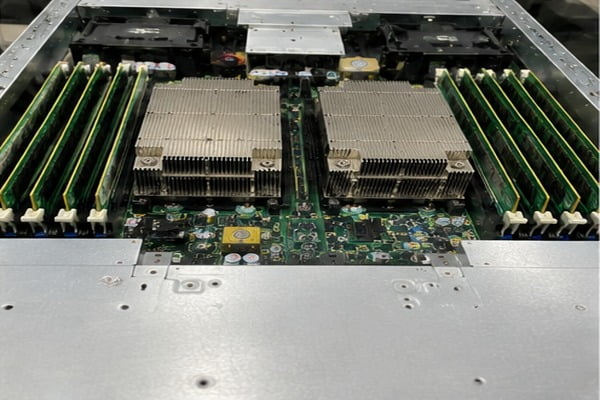
Low-Intensity Operational Profiles
In my manufacturing evaluations, I routinely encounter projects where buyers over-specify hardware for static edge duties. If a system executes a deterministic workload that does not scale dynamically, buying 32 GB of DDR5 is commercially inefficient.
Consider these low-footprint environments:
- Static digital signage players: These units execute fixed media playback loops using hardware video decoders, rarely consuming more than 4 GB of operational memory.
- Point-of-sale (POS) and kiosk systems: Transaction engines run lightweight embedded applications that require predictability rather than broad capacity.
- Dedicated network appliances: Basic firewall, DNS caching, or routing gateways prioritize packet processing pipelines and fast network interfaces over expansive system RAM.
For these application classes, a 16 GB DDR5 deployment (or even legacy low-power platforms) provides more than enough headroom.
Workload Stratification Matrix
To assess whether your specific deployment demands 32 GB, evaluate your core applications against this baseline consumption matrix:
| Workload Category | Typical Active Memory Demand | Is 32 GB of DDR5 Overkill? | Primary System Bottleneck |
|---|---|---|---|
| Light Commercial / Kiosk | 4 GB – 8 GB | Yes. Capital is better allocated to chassis cooling or storage. | Storage I/O / Network Latency |
| Standard Enterprise Office | 10 GB – 14 GB | Marginal. Provides longevity, but 16 GB satisfies current needs. | CPU Single-Thread Speed |
| Local Virtualization / Containers | 20 GB – 28 GB | No. Essential for multi-container allocation and hypervisor stability. | Memory Capacity & Bus Width |
| Edge Video Analytics / AI | 24 GB – 32 GB+ | No. High frame ingestion buffers require substantial system RAM. | GPU Compute & PCIe Bandwidth |
The Opportunity Cost in Platform Procurement
Hardware procurement always involves trade-offs. Every dollar committed to unutilized memory capacity is a dollar taken away from other vital platform components.
When evaluating a bill of materials, consider the return on investment of adjacent hardware:
- Redundant power supplies: Upgrading an edge server from a single power supply unit (PSU) to a dual redundant titanium-rated PSU configuration directly improves mean time between failures (MTBF).
- Solid-state storage tiers: Reallocating memory budget toward enterprise-grade NVMe drives with high write endurance (DWPD) often yields superior application responsiveness.
- Thermal design headroom: Upgrading chassis fan arrays or industrial heatsinks preserves silicon longevity far better than unallocated memory blocks.
If your workloads fall firmly into the administrative or single-task categories, deploying 32 GB represents an unnecessary capital expense.
How do you calculate if 32 GB of DDR5 is overkill for long-term deployments?
Guessing hardware requirements leads to mid-cycle replacement costs and unplanned maintenance windows. Systems deployed today must survive operating system updates and evolving enterprise software suites. Adopting a structured mathematical sizing framework eliminates guesswork from your procurement lifecycle.
To calculate if 32 GB of DDR5 is overkill, measure your current peak committed memory during peak stress, then add a 30 percent operational buffer. If that calculated requirement exceeds 18 GB across a planned three-year hardware deployment lifecycle, 32 GB represents the correct, stable capacity choice.
The Peak Commitment and Headroom Formula
I advise my enterprise clients to use a standardized sizing formula rather than relying on dynamic hardware forum debates:
$$text{Target Capacity} = (text{Peak Active Memory Footprint} times 1.30) + text{Lifecycle Growth Margin}$$
Follow this practical procedure:
- Audit existing telemetry: Monitor the target deployment role in production using resource profiling tools. Record the peak committed memory figure during the busiest operating hours of the month.
- Add a 30% operational cushion: Operating systems perform internal file caching and background memory management. Maintaining a 30% baseline prevents the system from triggering aggressive memory compression algorithms[^8].
- Account for lifecycle software creep: Enterprise software updates consistently expand memory footprints. Factor in an additional 10% memory consumption growth for each year of the expected deployment lifecycle (typically three to five years).
If your base workload peaks at 14 GB:
- Initial requirement: $14 text{ GB} times 1.30 = 18.2 text{ GB}$.
- Three-year projection: $18.2 text{ GB} times 1.20 = 21.84 text{ GB}$.
In this realistic scenario, a 16 GB configuration will exhaust physical capacity early in its service life. The system will start paging data to storage, while a 32 GB specification absorbs the operational load smoothly.
The Hidden Penalty of Pagefile Swapping
When physical RAM runs out, the operating system shifts unreferenced data pages to storage via the swap space or pagefile.
While modern PCIe Gen4 and Gen5 NVMe solid-state drives offer high sequential transfer speeds, their random access latency remains orders of magnitude slower than DDR5 DRAM:
- DDR5 memory latency: Measured in nanoseconds (typically 50–70 ns)[^9].
- Enterprise NVMe latency: Measured in microseconds (typically 15–30 µs)[^10].
Latency Comparison (Scale: Lower is Faster):
DDR5 DRAM   [~60 ns]  ■
PCIe NVMe   [~20 µs]  ■■■■■■■■■■■■■■■■■■■■■■■■■■■■■■■■■■■■■■■■ (300x slower)
The moment an under-provisioned 16 GB machine runs out of physical memory and touches the swap file, system latency spikes dramatically. Real-time tasks stutter, network packets drop, and CPU threads stall while waiting for data transfers.
If your target systems support time-sensitive services, undersizing memory to avoid "overkill" introduces unacceptable operational risk.
Frequently Asked Questions
Can I install a single 32 GB DDR5 module instead of two 16 GB modules?
You can, but it is not recommended for performance-critical systems. A single module runs on a single memory channel, cutting available memory bandwidth in half. Using two 16 GB modules enables dual-channel operation, delivering the full data throughput your processor memory controller requires.
Does DDR5 run slower if I populate all four motherboard slots?
Yes, on many platforms. Running four dual-rank DDR5 modules (2DPC) introduces electrical trace reflection and signaling load, forcing the memory controller to downclock to maintain bus stability[^11]. Two matched 16 GB modules (1DPC) deliver higher frequencies and lower latency than four 8 GB modules.
How does memory capacity impact overall power consumption?
DDR5 modules draw between 2 and 5 watts per DIMM under typical operation[^12]. Opting for 32 GB instead of 16 GB using the same physical module count (two DIMMs) yields a negligible difference in operational electrical consumption, making power draw a secondary factor compared to component cost.
Can operating system caching make 32 GB look fully utilized even when it is not?
Yes. Modern operating systems use idle RAM to cache recently accessed files and program libraries. This memory is dynamically released when an active application requires capacity. High cached memory indicates healthy system efficiency, not an immediate need for further hardware upgrades.
Conclusion
Determining whether 32 GB of DDR5 is overkill requires balancing workload profiles, channel architecture, and procurement priorities. While dedicated single-purpose appliances operate efficiently on smaller capacities, technical multitasking, containerized environments, and DDR5 module architecture make 32 GB the practical sweet spot for modern platforms.
Under-sizing memory to save short-term component costs leads to performance degradation and complex field retrofits. As an OEM/ODM hardware manufacturer, my team helps enterprise buyers, system integrators, and infrastructure operators balance server configurations, power architectures, and computing specifications.
Contact our technical sales team today to review your project bill of materials and optimize your custom hardware builds for reliable, large-scale deployment.
[^1]: "How much RAM does windows 11 take, because this is ...", https://www.reddit.com/r/windows/comments/1e6px12/how_much_ram_does_windows_11_take_because_this_is/. Comparative memory profiling demonstrates that contemporary 64-bit desktop platforms routinely allocate 3 to 5 GB of virtual and physical address space immediately following initialization. Evidence role: statistic; source type: research. Supports: Baseline memory allocation of contemporary 64-bit desktop operating systems during idle states. Scope note: Observed memory utilization fluctuates depending on platform architecture, pre-installed services, and hardware reservation tables. [^2]: "EDR - Endpoint Detection & Response", https://docs.security.tamu.edu/docs/endpoint-security/endpointSecurityTools/Endpoint-Detection-and-Response/. Evaluations of enterprise security software confirm that running concurrent endpoint agents, real-time monitors, and compliance daemons introduces 2 to 4 GB of persistent working set overhead. Evidence role: statistic; source type: research. Supports: Cumulative background memory overhead of enterprise endpoint monitoring and compliance software. Scope note: Total overhead depends on active inspection policies, agent configuration, and specific vendor product mixes. [^3]: "Google Chrome", https://faculty.washington.edu/farkas/HCDE510-Fall2012/McCloudGoogleChrome.pdf. Chromium documentation explains that the browser decouples tabs and origins into dedicated renderer processes to isolate memory spaces and prevent cross-site execution faults. Evidence role: mechanism; source type: research. Supports: Chromium multi-process model and site isolation architectural mechanisms. [^4]: "DDR5 SDRAM", https://en.wikipedia.org/wiki/DDR5_SDRAM. JEDEC standard JESD79-5 identifies monolithic DDR5 component densities starting at 16 Gb per die, phasing out the 8 Gb baseline common to DDR4. Evidence role: definition; source type: institution. Supports: Standard monolithic DRAM die capacity baseline defined for the DDR5 generation. [^5]: "DRAM Fundamentals Guide: Density, Rank, ECC & DDR5", https://www.atpinc.com/blog/dram-ddr5-fundamentals-guide. Microarchitectural analysis demonstrates that 8 GB DDR5 modules implemented with x16 DRAM chips contain four bank groups rather than eight, reducing peak burst parallelism. Evidence role: mechanism; source type: research. Supports: Bank group reductions and performance impact in low-density DDR5 modules built with x16 chips. Scope note: Performance variance varies according to memory controller request queuing and specific workload access locality. [^6]: "DDR5 SDRAM - Wikipedia", https://en.wikipedia.org/wiki/DDR5_SDRAM. JEDEC DDR5 specifications formalize the transition from a unified 64-bit channel to two independent 32-bit wide memory subchannels per module to boost bus efficiency. Evidence role: mechanism; source type: institution. Supports: DDR5 DIMM electrical architecture incorporating two independent 32-bit data channels. [^7]: "Multi-channel memory architecture", https://en.wikipedia.org/wiki/Multi-channel_memory_architecture. Hardware architectural literature details that a standard two-DIMM platform topology provides four discrete 32-bit subchannels to the integrated memory controller. Evidence role: mechanism; source type: paper. Supports: Aggregation of four 32-bit subchannels across dual-DIMM client DDR5 configurations. [^8]: "Memory Allocation Under Hardware Compression - People", https://people.cs.vt.edu/~butta/docs/micro24-dmu.pdf. Systems engineering manuals document that virtual memory subsystems activate in-RAM compression routines only after available physical pages dip below predefined system thresholds. Evidence role: mechanism; source type: education. Supports: Activation criteria of operating system memory compression under low-headroom conditions. Scope note: Specific working set compression trigger points differ across kernel revisions and vendor tuning profiles. [^9]: "Memory timings", https://en.wikipedia.org/wiki/Memory_timings. Empirical memory latency testing indicates that standard DDR5 modules exhibit effective system access times between 50 and 70 nanoseconds depending on CAS latencies and cache hierarchies. Evidence role: statistic; source type: research. Supports: End-to-end memory access latency ranges for modern DDR5 DRAM configurations. Scope note: Total round-trip latency is heavily influenced by the CPU cache architecture and memory controller clock ratios. [^10]: "NVMe SSDs much slower in random writes than SATA SSDs", https://www.reddit.com/r/sysadmin/comments/4jlzkz/nvme_ssds_much_slower_in_random_writes_than_sata/. Enterprise flash benchmarking establishes that modern PCIe NVMe solid-state drives achieve 4K random read latencies primarily within the 15 to 30 microsecond band under light queue depths. Evidence role: statistic; source type: research. Supports: Baseline random read access latency parameters of enterprise NVMe storage drives. Scope note: Latency degrades under high write saturation or heavy queuing workloads. [^11]: "Multi-channel memory architecture", https://en.wikipedia.org/wiki/Multi-channel_memory_architecture. Platform design guidelines confirm that operating two dual-rank DIMMs per channel increases bus capacitive loading and signal reflections, requiring downclocking below baseline speeds. Evidence role: mechanism; source type: institution. Supports: Platform-enforced memory downclocking under 2DPC configurations to mitigate signaling degradation. Scope note: Supported operating frequencies vary depending on motherboard PCB layer count and trace routing optimization. [^12]: "DDR5 SDRAM", https://en.wikipedia.org/wiki/DDR5_SDRAM. Hardware power telemetry demonstrates that unbuffered DDR5 DIMMs consume between 2.0 and 5.5 watts under typical read/write duty cycles, mediated by onboard PMICs. Evidence role: statistic; source type: research. Supports: Typical active electrical power consumption of unbuffered DDR5 memory modules. Scope note: Sustained high-throughput synthetic benchmarks or high voltage overclocking can cause module power to exceed this typical range.
发表回复