

Many hardware enthusiasts wonder if they can turn a ser […]
Many hardware enthusiasts wonder if they can turn a server into a gaming PC to secure massive core counts at bargain prices. However, surplus enterprise equipment introduces severe hidden operational hurdles. Without understanding these engineering constraints, you risk burning your budget on an unusable, deafening desktop replacement.
Yes, you can turn a server into a gaming PC, but it is rarely practical for standard desktop gaming. While enterprise platforms accept high-end hardware, they suffer from low single-core clock speeds, aggressive cooling noise, proprietary power delivery, and absent video outputs. Converting rackmount hardware usually yields poor gaming performance and high ongoing electrical costs.

In my consultations with enterprise clients, procurement teams frequently ask if decommissioned server chassis can double as engineering workstations or personal rigs. The hardware looks tempting on a raw spreadsheet, but real-world engineering constraints quickly destroy that illusion. Let us examine what happens when commercial server gear meets modern consumer gaming workloads.
Why do buyers attempt to turn a server into a gaming PC?
Budget-minded builders often look at secondary enterprise marketplaces when retail graphics cards and desktop processors spike in price. They see commercial platforms offering 32 or 64 processor cores alongside hundreds of gigabytes of memory for pennies on the dollar. The prospect feels like an obvious performance bargain.
Buyers attempt this conversion because surplus enterprise servers provide immense multi-core processing power, massive memory bandwidth, and high PCIe lane counts at low secondary-market acquisition costs. On paper, these multi-socket systems appear to rival premium desktop gaming rigs for a fraction of the retail price.

The Lure of Enterprise Hardware Specs
When corporate data centers refresh their hardware cycles every three to five years[^1], surplus enterprise hardware floods wholesale channels. Buyers see multi-socket motherboards supporting dual Intel Xeon or AMD EPYC processors. They see 128 GB of registered ECC DDR4 or DDR5 RAM included in the baseline bundle.
Because modern desktop games demand multi-threading support, buyers assume more cores automatically guarantee smoother frame rates. Furthermore, commercial motherboards provide four to six full-length PCIe x16 slots driven directly by enterprise CPU root complexes. This setup suggests endless bandwidth for expansion cards, capture devices, and high-speed NVMe storage arrays.
Spec Sheet Illusions vs. Architectural Reality
A retail gaming desktop prioritizes low-latency execution and high burst frequencies across a small cluster of processing cores. Enterprise platforms, by contrast, focus on parallel throughput across continuous virtualized environments.
| Feature Category | Enterprise Server Platform | Consumer Gaming Desktop |
|---|---|---|
| CPU Clock Targets | Low base clock (2.0–2.8 GHz), all-core stability | High boost clock (4.5–5.7 GHz), single-core focus |
| Memory Architecture | High-capacity, multi-channel Registered ECC (higher latency) | Low-latency, dual-channel unbuffered DDR4/DDR5 |
| PCIe Lane Provisioning | 64 to 128 lanes optimized for multiple storage/NIC HBAs | 16 to 24 lanes dedicated to primary GPU and direct M.2 |
| Acoustic Targets | 60 to 80+ dB under high-static pressure fans | Under 35 dB using low-RPM axial fans |
| Thermal Operating Envelope | High-ambient chassis flow (chassis-managed) | Localized heat dissipation (heatsink/AIO fans) |
When you look at this architectural comparison, the core conflict becomes obvious. Server platforms deliver sustained parallel work, but gaming engines prioritize immediate sequential instructions.
What architectural limits arise when you turn a server into a gaming PC?
Gamers expect fluid frame times and instant application response, but enterprise microarchitectures are tuned for sustained multi-tenant processing. This fundamental conflict leads to performance bottlenecks that no amount of software optimization can solve. You end up with powerful silicon that struggles to run simple game loops smoothly.
The primary architectural limits are low single-core clock speeds, high memory latency from registered ECC modules, and multi-socket NUMA boundaries. These factors starve the graphics processing unit of quick instructions, which causes frame drops, micro-stuttering, and reduced average frame rates compared to modern consumer desktop processors.
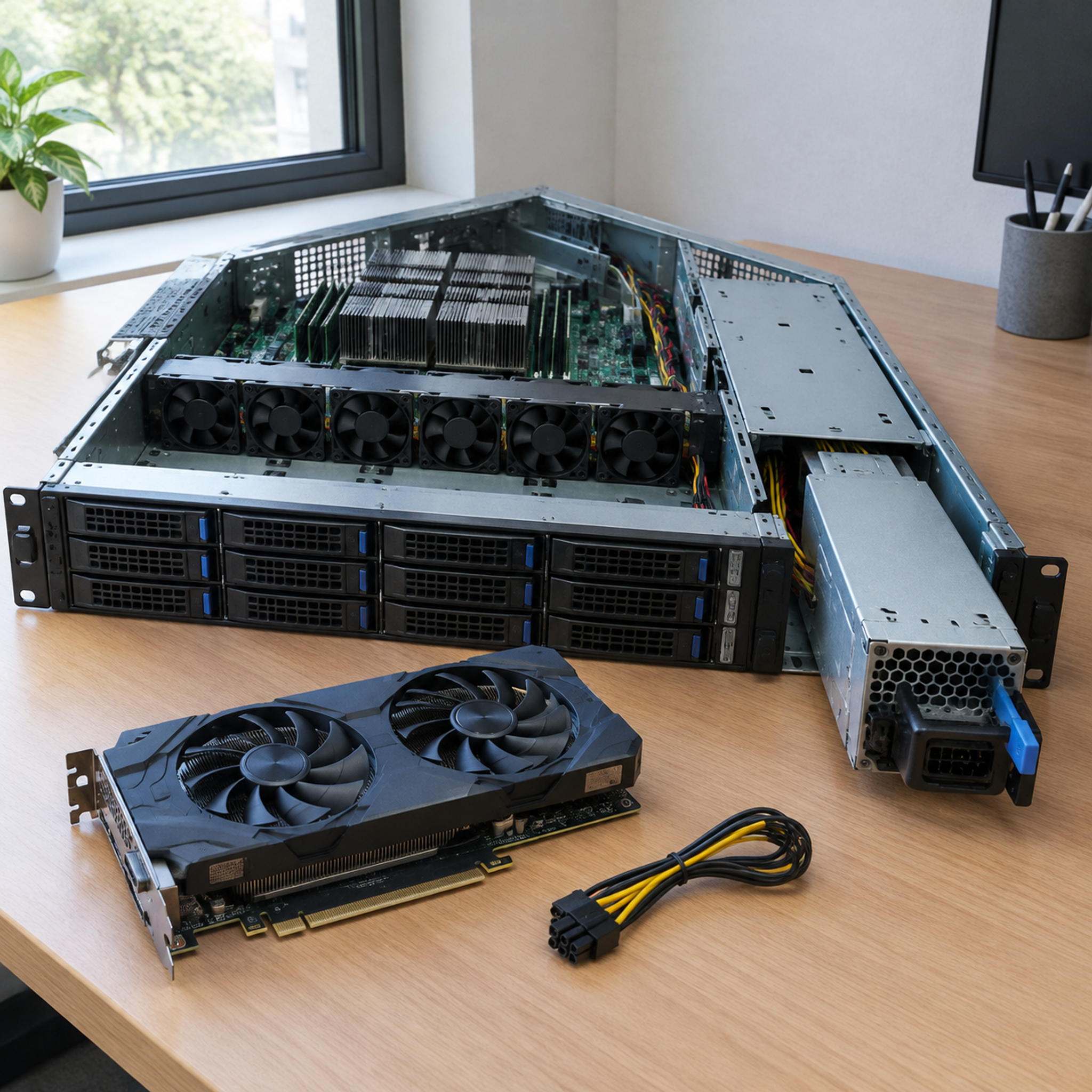
The Single-Thread Bottleneck
Modern game engines rely on a main render thread to handle physics, asset staging, and draw-call dispatching to the GPU. Even games optimized for multi-core processors usually balance tasks across six to eight fast threads[^2] rather than thirty-two slow ones.
Enterprise CPUs operate at modest clock speeds—often between 2.2 GHz and 3.0 GHz—to remain inside manageable thermal design power (TDP) envelopes during 24/7 continuous operation. A modern consumer desktop processor, meanwhile, boosts individual cores past 5.0 GHz. If your CPU cannot deliver draw calls to your graphics card quickly enough, your GPU sits idle waiting for data, regardless of how many spare cores you have.
Memory Latency and NUMA Topologies
Dual-socket enterprise servers divide system memory across Non-Uniform Memory Access (NUMA) nodes[^3]. Each CPU directly controls its own memory channels:
- Local Node Access: When CPU 0 accesses memory wired directly to CPU 0, data transfers at standard speed.
- Cross-Node Latency Penalty: When a thread on CPU 0 needs data stored in memory modules wired to CPU 1, data must traverse the interconnect bus (such as Intel UPI or AMD Infinity Fabric[^4]).
- Gaming Thread Migration: Standard desktop operating systems do not always pin gaming execution threads to a single physical socket. When threads bounce across sockets, memory latency spikes immediately.
This architectural hop produces sudden frame-time spikes. Even if your average frame rate looks acceptable, the 1% and 0.1% low frame metrics drop significantly. That latency variance appears on screen as persistent stuttering.
Motherboard and Display Limitations
Server motherboards are designed to be managed remotely over a local network. They feature integrated baseboard management controllers (such as ASPEED AST chips)[^5] that output basic 2D video via legacy VGA ports for initial setup.
These boards often lack modern consumer platform amenities:
- They do not have integrated audio controllers, which means you must purchase a separate USB DAC or PCIe sound card.
- Their UEFI firmware often lacks support for consumer GPU handshakes, Resizable BAR (ReBAR)[^6], or variable refresh rates.
- Sleep and low-power standby states do not exist in enterprise BIOS environments, which prevents normal power saving.
How do power delivery and cooling complicate this conversion?
Enterprise servers rely on centralized infrastructure power and wind-tunnel acoustic designs to stay cool in server rooms. Moving that hardware into a quiet bedroom or home office creates immediate physical conflicts. The machine will draw extreme power and generate intolerable fan noise.
Enterprise power supplies lack standard consumer 8-pin PCIe cables and rely on proprietary power distribution backplanes. Simultaneously, high-density server chassis rely on high-RPM cooling fans to force air across passive heatsinks. These industrial fans generate piercing acoustic whine that makes normal desktop room operation unbearable.

Proprietary Power Distribution
Standard consumer power supply units use standard ATX connections with dedicated 6+2 pin connectors for expansion cards. Enterprise rackmount chassis do not use ATX power supplies. Instead, they use hot-swappable, high-efficiency server power modules that plug directly into a shared power distribution backplane.
Enterprise Power Flow:
[Hot-Swap Redundant PSU] --> [Proprietary Backplane] --> [Motherboard Edge Connector]
                                       |
                                       +--> (Proprietary 12V Aux Harnesses)
These distribution backplanes rarely supply standard 8-pin auxiliary power connectors for commercial GPUs. In our manufacturing facility, we design backplanes specifically for defined enterprise loads. Modifying these interfaces with cheap third-party adapter harnesses creates a fire hazard. Many surplus boards will not even initialize without detecting specific telemetry signals from their matching proprietary power supplies.
Industrial Cooling Profiles
Servers do not use quiet, oversized heatsinks with large, slow-moving axial fans. Space constraints inside 1U and 2U rackmount enclosures require compact copper heatsinks without integrated fans.
Cooling is handled by an array of 40mm or 80mm high-static-pressure counter-rotating fans positioned in the middle of the chassis:
- Operating Speeds: These fans routinely operate between 8,000 and 16,000 RPM[^7].
- Acoustic Noise: A running enterprise chassis often produces continuous noise that exceeds 65 to 75 decibels[^8].
- Firmware Throttling: Server firmware monitors internal thermal sensors continuously. If you unplug the stock fans or slow them down with resistors, the BMC will trigger an emergency thermal shutdown or throttle the processors to their lowest frequency.
Rackmount Form Factors vs. Enterprise Tower Workstations
The mechanical viability of this project depends entirely on the chassis format you select. Buyers often lump all commercial hardware into a single category, which leads to expensive purchasing mistakes.
Chassis Evaluation Hierarchy:

1U Rackmount Chassis ----> [IMPOSSIBLE] -> Insufficient vertical clearance for standard GPUs
2U Rackmount Chassis ----> [SEVERE]     -> Requires riser cards, custom blowers, deafening noise
4U Rackmount Chassis ----> [DIFFICULT]  -> Fits full-height cards; still loud, needs custom wiring
Enterprise Workstation -> [VIABLE]     -> Standard desktop form factor, quiet fans, ATX power
Enterprise tower workstations (such as Dell Precision or HP Z-series systems) sit in an entirely different category than rackmount units. These platforms share corporate motherboards, but they incorporate standard acoustic dampening, side-panel clearance for full-height GPUs, and standard thermal management.
Does it make financial sense to turn a server into a gaming PC?
Decommissioned servers often sell for low prices on auction sites, which lures hobbyists into an expensive financial trap. Once you tally up the custom components and energy usage needed to make the machine usable, the upfront savings disappear. You usually spend more money for a worse gaming experience.
It rarely makes financial sense because hidden conversion costs erase the initial price advantage. Adapters, replacement workstation heatsinks, proprietary power harnesses, and high 24/7 idle power consumption push the total cost of ownership beyond that of an equivalent, modern mid-range consumer gaming system.

The Total Cost of Ownership (TCO) Illusion
A buyer might acquire a complete dual-socket 2U rack server for $250. That looks like incredible value on paper. However, transforming that rack-mounted system into a functional, quiet living-room gaming PC requires extensive modification.
| Expense Item | Est. Budget Impact | Engineering Rationale |
|---|---|---|
| Initial Surplus Server | $250 – $350 | Base multi-core dual CPU unit with ECC RAM |
| High-Wattage Consumer GPU | $300 – $600 | Required for 3D rendering (servers have basic 2D chips) |
| PCIe Power Breakout Board | $30 – $60 | Extracts 12V GPU rails safely from proprietary server backplanes |
| Active Workstation Heatsinks | $80 – $140 | Replaces passive aluminum blocks to allow lower fan speeds |
| Chassis or Open-Frame Rig | $70 – $120 | Needed if the original 1U/2U rack chassis cannot fit full-height GPUs |
| Dedicated Audio / USB DAC | $25 – $50 | Provides audio outputs missing from server motherboards |
| Realized Upfront Total | $755 – $1,320 | Comparable to a brand-new Ryzen 5 or Core i5 platform |
Beyond the hardware purchase, the ongoing operating costs run high. An enterprise server idles at 100 to 200 watts[^9] simply maintaining its enterprise controllers, multi-channel memory buses, and redundant fan arrays. A modern desktop PC, by comparison, typically idles below 50 watts.
When Repurposing Server Hardware Makes Sense
There are specific, practical use cases where enterprise hardware serves home-lab hobbyists effectively. The conversion works well when you respect the hardware's original engineering intent:
- Dedicated Game Server Hosting: Hosting persistent multiplayer sessions (such as Palworld, Ark, or Minecraft) requires substantial RAM and multi-threaded parallel throughput. In this role, the server runs headlessly in a basement or closet without a graphics card.
- Virtualization Lab with GPU Passthrough: Advanced users can run hypervisors like Proxmox VE or Unraid. You can install an enterprise accelerator card, split hardware resources across multiple isolated virtual machines, and stream games over your local network via Moonlight or Sunshine.
- Enterprise Tower Upgrades: Buying an enterprise tower workstation bypasses the severe physical and acoustic limitations of rack servers entirely. These systems offer clean, quiet desktop computing platforms out of the box.
Frequently Asked Questions
Can I install Windows 11 on an enterprise server?
Yes, but you may face hardware compatibility barriers. Windows 11 strictly requires TPM 2.0[^10] and specific supported processor generations. Older enterprise motherboards often lack physical TPM 2.0 headers, and enterprise storage controllers frequently require specialized SAS/SATA drivers during initial setup before the Windows installer can recognize your drives.
Can an enterprise server motherboard fit inside a normal desktop PC case?
Usually, no. Server motherboards use form factors like SSI-EEB, SSI-CEB[^11], or proprietary shapes with non-standard mounting hole locations. These boards will not line up with ATX mounting standoffs. You will need a specialized open-frame bench, an industrial workstation tower case, or custom fabrication to mount the board securely.
Will high-end consumer graphics cards work in PCIe server slots?
Yes, provided the motherboard UEFI recognizes the consumer GPU and the slot supplies sufficient clearance and power. Many rack servers only provide 25W to 50W over their PCIe slots rather than the full 75W ATX standard[^12]. You must confirm that the expansion riser and external wiring can provide adequate power safely.
Conclusion
Attempting to turn a server into a gaming PC is a rewarding technical exercise for hardware hobbyists, but it is rarely a practical way to save money. The architectural gulf between enterprise parallel throughput and consumer real-time gaming creates inescapable bottlenecks. Proprietary power pinouts, deafening acoustic fan profiles, slow single-core clock speeds, and hidden conversion costs almost always outweigh the low upfront price of surplus commercial hardware.
If you are an IT buyer, system integrator, or enterprise project manager seeking reliable, purpose-built platforms, our engineering team designs and manufactures certified rackmount hardware, specialized chassis, and high-efficiency power architectures. Contact our hardware specialists today to discuss your enterprise computing and OEM server manufacturing requirements.
[^1]: "Navigating Hardware Refresh Cycles in the Data Center", https://horizontechnology.com/news/data-center-hardware-refresh-cycles/. Studies on enterprise data center asset management show typical IT server refresh intervals span 36 to 60 months to balance maintenance costs and power efficiency. Evidence role: statistic; source type: research. Supports: Enterprise data centers generally operate on 3- to 5-year hardware replacement and depreciation cycles.. Scope note: Lifecycles can vary depending on organizational capital expenditure budgets and hyperscaler depreciation policies. [^2]: "Understanding CPU core/thread utilization in games and ...", https://www.reddit.com/r/hardware/comments/jyak87/understanding_cpu_corethread_utilization_in_games/. Empirical analyses of multi-threaded game engine architectures demonstrate diminishing frame-time improvements when scaling execution pipelines beyond 6 to 8 synchronized worker threads. Evidence role: mechanism; source type: paper. Supports: Real-time game engines face scaling limits where rendering, simulation, and main logic predominantly utilize 6 to 8 concurrent threads.. Scope note: Modern graphics APIs like DirectX 12 and Vulkan can dispatch draw calls across more threads, though main-thread frame synchronization remains a bottleneck. [^3]: "An overview of non-uniform memory access", https://dl.acm.org/doi/10.1145/2500468.2500477. Standard computer architecture texts define Non-Uniform Memory Access as a multiprocessing architecture where memory access time depends directly on the memory's physical location relative to the executing processor core. Evidence role: definition; source type: encyclopedia. Supports: NUMA organizes multi-processor memory so that accessing local memory yields lower latency and higher bandwidth than accessing remote memory across node boundaries.. [^4]: "Intel Ultra Path Interconnect", https://en.wikipedia.org/wiki/Intel_Ultra_Path_Interconnect. Technical architecture reports outline how point-to-point interconnects like Intel UPI and AMD Infinity Fabric maintain cache coherency across discrete physical sockets at the expense of cross-link latency. Evidence role: mechanism; source type: paper. Supports: Inter-socket coherent communication is mediated by specialized fabrics like Intel UPI and AMD Infinity Fabric, which introduce point-to-point traversal overhead.. Scope note: Transfer latency and bus bandwidth vary considerably across microarchitecture generations. [^5]: "Baseboard Management Controller (BMC)", http://www.aspeedtech.com/server/. Hardware specifications confirm that specialized BMC SoCs, such as the ASPEED AST series, incorporate basic 2D graphics controllers designed solely for server provisioning and remote KVM operation. Evidence role: mechanism; source type: encyclopedia. Supports: Baseboard management controllers commonly integrate simple 2D display engines intended primarily for setup and remote out-of-band administration.. [^6]: "What Is Resizable BAR and How Do I Enable It?", https://www.intel.com/content/www/us/en/support/articles/000090831.html. The PCI-SIG specification defines Resizable BAR as an optional capability that allows a system to negotiate a larger Base Address Register window to address the entirety of device memory directly. Evidence role: definition; source type: institution. Supports: Resizable BAR is an optional PCIe capability enabling dynamic CPU negotiation of the GPU frame buffer aperture size.. [^7]: "Suitable fans for 1U server", https://forum.level1techs.com/t/suitable-fans-for-1u-server/190357. Thermal management analyses of dense rackmount servers indicate that 40mm and 80mm chassis fan arrays routinely reach operating speeds of 8,000 to 16,000 RPM to drive airflow through passive heatsink fins. Evidence role: statistic; source type: research. Supports: High-density 40mm and 80mm enterprise cooling fans operate at rotational velocities exceeding 8,000 to 16,000 RPM to sustain required static pressure.. Scope note: Actual operating speeds vary based on thermal profile curves, dynamic pulse-width modulation, and system workload. [^8]: "What are the decibels of your server? : r/HomeServer", https://www.reddit.com/r/HomeServer/comments/qiivw8/what_are_the_decibels_of_your_server/. Acoustical measurements of enterprise rack systems indicate typical sound pressure levels ranging between 65 and 78 dBA under continuous cooling operation. Evidence role: statistic; source type: research. Supports: Standard rackmount server enclosures emit acoustic noise levels between 65 and 75 dBA during normal to high operational activity.. Scope note: Acoustic emissions depend heavily on measurement distance, chassis depth, fan quantity, and room reverberation characteristics. [^9]: "Power consumption dual socket Intel Xeon 2696V2", https://www.reddit.com/r/homelab/comments/u90n87/power_consumption_dual_socket_intel_xeon_2696v2/. Standardized SPECpower benchmarks show that multi-socket servers with redundant power supplies, multi-channel registered memory, and active BMC controllers routinely exhibit baseline idle draws in the 100 to 200 watt window. Evidence role: statistic; source type: research. Supports: Multi-socket enterprise server platforms exhibit typical baseline idle power consumption between 100 and 200 watts.. Scope note: Idle consumption fluctuates based on processor TDP generation, populated DIMM count, and installed expansion cards. [^10]: "Enable TPM 2.0 on your PC", https://support.microsoft.com/en-us/windows/security/devicesecurity/enable-tpm-2-0-on-your-pc. Official operating system hardware guidelines designate a compliant Trusted Platform Module (TPM 2.0) as a mandatory architectural prerequisite for running Windows 11. Evidence role: expert_consensus; source type: institution. Supports: TPM version 2.0 compliance is a non-negotiable baseline hardware requirement for standard Windows 11 installation and secure boot verification.. [^11]: "SSI CEB", https://en.wikipedia.org/wiki/SSI_CEB. The Server System Infrastructure (SSI) specification outlines standardized mechanical form factors, including SSI-EEB and SSI-CEB, which feature mounting standoff arrangements incompatible with consumer ATX chassis. Evidence role: definition; source type: encyclopedia. Supports: SSI-EEB and SSI-CEB are defined industry standards specifying mechanical dimensions and mounting standoff locations for multi-processor server boards.. [^12]: "PCI Express Card Electromechanical Specification ...", https://pcisig.com/PCIExpress/Specs/CEM/CardElectromechanical_5.1_1.0. The PCI-SIG Card Electromechanical Specification standardizes that a full-length x16 expansion slot may provide up to 75 watts directly across the connector pins to powered add-in cards. Evidence role: definition; source type: institution. Supports: The PCI Express Electromechanical standard specifies a maximum power delivery capability of 75 watts through a full-height PCIe x16 slot.. Scope note: Low-profile or reduced-power server riser implementations may restrict per-slot power delivery below the 75W ceiling.
发表回复