

The server ram vs desktop ram debate frequently surface […]
The server ram vs desktop ram debate frequently surfaces during bill of materials reviews when procurement teams face margin pressure. Sourcing managers observe matching DDR generation standards and assume these modules are interchangeable commodities. However, bypassing enterprise hardware specifications creates hidden points of failure that threaten deployment timelines and operational stability.
The choice between server RAM and desktop RAM comes down to data integrity, memory density, and architectural support rather than raw clock speed. Desktop memory relies on unbuffered modules (UDIMM) tuned for consumer workloads. In contrast, enterprise server platforms require registered ECC memory (RDIMM/LRDIMM) to ensure system uptime, prevent silent data corruption, and support massive multi-channel memory pools.
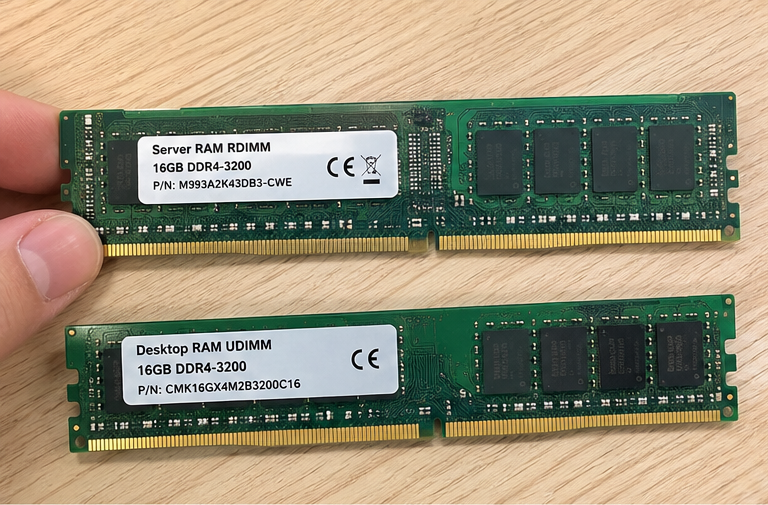
In my pre-sales hardware consultations, technical buyers often ask if standard consumer memory can trim project expenses. The answer requires looking beneath physical dimensions and surface specifications. Let us evaluate how physical signaling, data correction protocols, and financial liability define these two memory categories.
Why Does the Server RAM vs Desktop RAM Architecture Prevent Swapping?
Procurement teams often observe identical pin counts on module specification sheets and assume cross-compatibility. This assumption leads to failed post-assembly tests and delayed shipments. Server boards and consumer systems demand completely different physical signaling and memory controller microcode.
Server RAM and desktop RAM cannot swap across platforms because their memory architectures serve opposing electrical loads. While both memory types share common DDR pin counts, enterprise server boards require registered clock buffers to stabilize high-capacity memory buses. Standard desktop motherboards lack the physical traces and chipset support needed to run enterprise RDIMMs[^1].
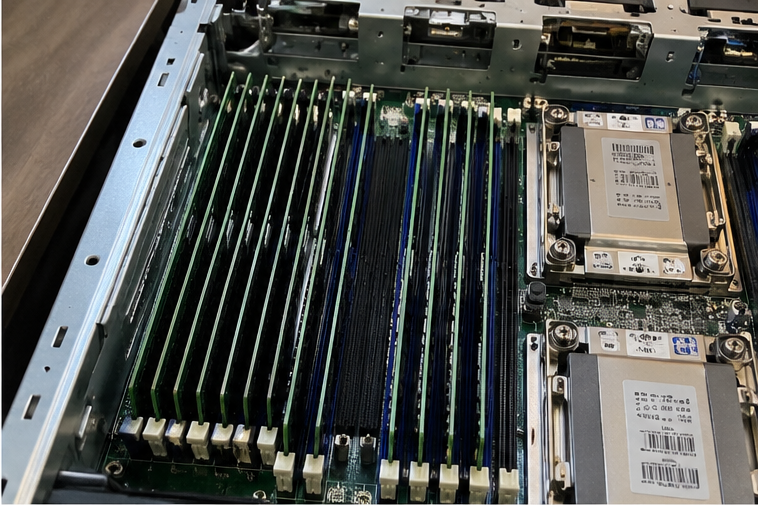
During client qualification calls, I regularly encounter engineering teams who attempted to run cost-saving trials using consumer RAM in enterprise rackmount chassis. The system inevitably halts at power-on self-test (POST). Even though a DDR4 or DDR5 desktop stick fits neatly into the motherboard DIMM slot, the processor's memory controller cannot communicate with the module.
Enterprise deployments demand high memory density across multiple channels. A dual-socket enterprise server often features 16 to 32 memory slots. If a system used unbuffered desktop memory across 32 slots, the electrical load would overwhelm the CPU memory controller. The electrical bus lines would suffer extreme signal attenuation, causing immediate boot failure.
To resolve this issue, enterprise server RAM adds a dedicated hardware chip known as a Registering Clock Buffer (RCD)[^2]. This design creates Registered DIMMs (RDIMMs). The RCD buffers the command and address lines between the system memory controller and the individual DRAM chips. The CPU memory controller communicates directly with the register rather than managing dozens of individual DRAM chips. This architecture stabilizes the electrical bus, allowing systems to scale to terabytes of system memory.
The table below outlines the core structural differences between standard module form factors:
| Architectural Metric | Desktop RAM (UDIMM) | Server RAM (RDIMM) | Server RAM (LRDIMM) |
|---|---|---|---|
| Buffering Mechanism | None (Unbuffered) | Command/Address Registered (RCD) | Fully Buffered (RCD + Data Buffers) |
| Bus Signal Loading | High load on CPU controller | Isolated command load | Isolated command and data load |
| Max Capacity per Stick | Typically 32GB – 48GB | 64GB – 128GB+ | 128GB – 256GB+ |
| Platform Target | Consumer PCs, Entry Workstations | Enterprise Servers, Cloud Nodes | Hyperscale Compute, AI/HPC Clusters |
| Motherboard Support | Consumer chipsets (Z/B/X series) | Enterprise sockets (SP5, LGA4677) | Multi-socket Enterprise Nodes |
Load-Reduced DIMMs (LRDIMMs) take this buffering architecture one step further. They replace the single register with distributed data buffers[^3]. These buffers isolate both command and data lines from the memory controller. This configuration allows hyperscale operators to populate every DIMM slot with high-capacity memory ranks without degrading platform bus speeds. Desktop RAM modules lack these buffering mechanisms entirely.
Consultant Checkpoint: Motherboard memory support is governed strictly by the processor socket and chipset firmware. Never source memory based purely on physical module dimensions or pin counts. Always verify the memory Qualified Vendor List (QVL) provided by your platform manufacturer.
How Does Error Correction Distinguish Server RAM vs Desktop RAM?
Silent data corruption poses a severe threat to transaction databases and cloud storage platforms.[^4] Consumer desktop systems can tolerate an intermittent application crash or unexpected reboot. Enterprise systems, however, cannot accept corrupted database tables or compromised financial logs.
Server RAM integrates dedicated Error-Correcting Code (ECC) to identify and repair single-bit memory faults dynamically. Standard desktop RAM lacks real-time parity checking across the memory bus. When electrical interference or alpha particles flip a bit on unbuffered consumer memory, the host system crashes or writes corrupted data directly to enterprise storage arrays.
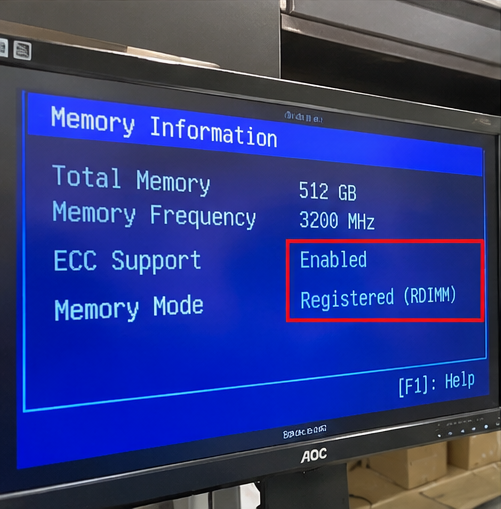
The physical root cause of memory corruption often originates from environmental factors. Background electrical interference, thermal stress, and cosmic rays can alter the electrical charge of a DRAM cell[^5]. This event changes a binary zero to a one, or vice versa. This phenomenon is known as a soft error or a single-bit flip.
In consumer desktop memory, the system bus is 64 bits wide[^6]. It transfers data without dedicated parity validation. If an electrical anomaly flips a bit within an unbuffered desktop DIMM, the operating system remains unaware of the fault. The system either generates an abrupt operating system panic or commits bad data directly to the storage volume.
Enterprise server RAM utilizes a 72-bit bus structure (or an 80-bit structure in DDR5 sub-channels)[^7]. These additional physical lines carry dedicated parity bits calculated by the ECC algorithm. This parity architecture allows the memory subsystem to accomplish the following tasks:
- Detect and Correct Single-Bit Errors: The memory controller detects and repairs single-bit errors instantaneously[^8] without interrupting running workloads.
- Halt on Multi-Bit Errors: If multiple bits flip within a word, the hardware detects the error and initiates a controlled system halt to prevent silent data corruption.
- Enable Memory Scrubbing: Enterprise server platforms periodically sweep DRAM banks to locate, correct, and log intermittent soft errors[^9] before they compound.
- Support Advanced Resiliency: Server hardware supports enterprise features like Chipkill and memory rank sparing[^10]. If a DRAM chip fails entirely, the system continues running until maintenance windows allow replacement.
A frequent misunderstanding in current procurement discussions involves DDR5 consumer memory. DDR5 desktop modules feature On-Die ECC. Buyers often confuse this with full enterprise ECC. On-Die ECC only corrects electrical faults inside the individual silicon die[^11] during internal read/write cycles. It does not protect the data payload as it moves across the external bus between the RAM module and the CPU. Enterprise server RAM features sideband bus ECC, protecting the entire data path from memory die to CPU registers.
What Are the Financial Risks in the Server RAM vs Desktop RAM Decision?
Procurement teams are incentivized to optimize component spending across hardware rollouts. Cutting memory line-item expenses appears to deliver quick budget wins. However, balancing total cost of ownership against component purchase prices reveals that cutting memory specifications creates significant long-term financial liabilities.
The financial trade-off in the server RAM vs desktop RAM decision centers on business interruption costs. While consumer desktop RAM carries a lower initial module price, using unbuffered memory in mission-critical servers leads to unscheduled outages, corrupted storage records, technician dispatch expenses, and contractual SLA breach penalties.
In our manufacturing and integration operations, we evaluate hardware selection through an operational risk framework. When a data center operator experiences unexpected downtime, component cost savings vanish instantly. Enterprise service-level agreements enforce strict financial penalties for downtime. If an unbuffered memory module causes a cloud cluster to crash, the financial penalties quickly outstrip the initial procurement savings.
Consider the operational costs associated with hardware triage:
- Field Engineering Overhead: Locating a non-ECC memory failure requires dedicated technician hours. Technicians must pull memory logs, run stress diagnostics, and perform manual module isolation.
- Database Reconstruction Costs: When non-ECC RAM causes silent write corruptions, system administrators must take production databases offline to restore backups and re-run lost transaction logs.
- Warranty Invalidation: Enterprise platform manufacturers validate platforms exclusively with certified enterprise modules. Installing consumer unbuffered DIMMs into server platforms voids hardware support contracts and engineering warranties.
The financial comparison below illustrates how component choices influence operational expenses:
| Evaluation Criteria | Desktop RAM Deployment | Server RAM Deployment |
|---|---|---|
| Initial Capital Expense (CapEx) | Lower unit cost per module | Higher unit cost per module |
| System Uptime Profile | Prone to unlogged reboot interruptions | Engineered for continuous 24/7 availability |
| Failure Diagnosis Speed | Slow; lacks hardware-level error logs | Fast; registers precise DIMM/rank error logs |
| Data Integrity Assurance | Zero sideband parity protection | Complete real-time bus parity validation |
| Platform Warranty Status | Risk of voided platform support | Fully backed by OEM validation cycles |
| Scalability per Channel | Limited to 2 DIMMs per channel max | Scales across multi-rank, multi-channel designs |
Enterprise buyers should view server memory as operational insurance. The price delta covers the registered buffer hardware, sideband ECC silicon, comprehensive thermal cycling, and extended factory qualification runs. For enterprise workloads, these safeguards protect your organization against unplanned downtime.
How Should You Evaluate Workloads for Server RAM vs Desktop RAM?
Deploying infrastructure successfully requires matching hardware architecture to application duty cycles. Sourcing teams should not default to maximum-spec hardware for simple workloads, nor should they cut corners on mission-critical platforms. Establishing a technical evaluation checklist helps buyers specify appropriate memory architectures for their applications.
Workload evaluation requires assessing memory density, application duty cycles, and the business impact of downtime. Non-ECC desktop RAM can support low-risk edge prototypes and benchtop development units. In contrast, virtualized data centers, enterprise resource databases, and distributed compute platforms require registered server RAM to maintain data integrity and hardware stability.
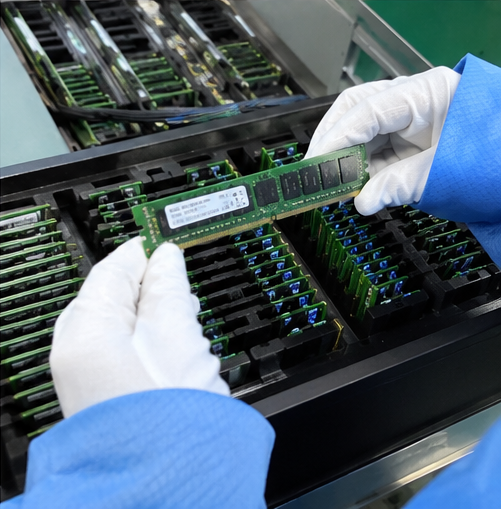
When consulting on custom platform designs, I walk procurement teams through a qualification matrix. Sizing memory profiles involves assessing three specific application variables:
1. Platform Memory Density Requirements
Desktop memory platforms feature strict physical and electrical limitations. Most consumer boards support four DIMM slots, capping total memory capacity at 128GB or 192GB. If your application handles virtualization, multi-tenant containers, or large in-memory databases, desktop platforms cannot scale to meet your density requirements. Enterprise server platforms support multi-channel configurations running dozens of RDIMMs, scaling memory capacity well into multi-terabyte thresholds.
2. Operational Duty Cycles and Thermal Exposure
Desktop RAM is rated for commercial office environments and intermittent consumer usage profiles. Server chassis, by comparison, operate continuously in high-density rack configurations. Server memory modules are tested for prolonged thermal exposure and constant airflow environments. Modules engineered for servers maintain signal stability despite high ambient chassis temperatures.
3. Application Fault Tolerance
Procurement buyers must evaluate what occurs when a memory fault strikes the target application. We categorize operational workloads by tolerance levels:
- Non-Critical Workloads (Desktop RAM Viable): Internal software test harnesses, isolated developer sandbox environments, and entry-level edge telemetry collectors. If these systems crash, the operational impact remains low.
- Mission-Critical Workloads (Server RAM Mandatory): Transactional databases, Enterprise Resource Planning (ERP) systems, hypervisor clusters, and financial trading platforms. Any memory corruption in these environments results in data loss, regulatory penalties, and significant business disruption.
- Compute-Dense Workloads (High-Density Server RAM Mandatory): Artificial intelligence training, large language model inference nodes, and high-performance computing (HPC) simulations. These workloads require high-density RDIMMs and LRDIMMs to maintain continuous memory bandwidth without system halts.
Selecting the right memory architecture requires balancing operational risk against financial constraints. Identifying these system boundaries early in the procurement phase protects projects from costly hardware retrofits down the road.
Frequently Asked Questions
Can you put desktop RAM into a server motherboard?
No, you cannot run desktop RAM in an enterprise server motherboard. Even if the DDR generation and pin count match, enterprise server chipsets require registered clock buffers and sideband ECC signaling. Unbuffered desktop memory will fail power-on self-tests and prevent the server from booting.
Is server RAM slower than desktop RAM?
Server RAM often features slightly higher CAS latencies than desktop RAM because of the processing cycles required for register buffering[^12] and ECC calculations. However, server RAM provides significantly higher overall memory density, sustained bandwidth, and rock-solid platform stability across continuous multi-threaded enterprise workloads.
Does DDR5 desktop RAM have ECC like server RAM?
No, DDR5 desktop memory does not replace enterprise ECC. DDR5 desktop RAM features On-Die ECC, which only cleans errors inside individual DRAM chips. It lacks the dedicated sideband bus lines and parity hardware required to protect data as it moves between the module and CPU.
What is the difference between RDIMM and UDIMM?
UDIMM (unbuffered memory) connects directly to the CPU memory controller, limiting total system memory capacity and stability. RDIMM (registered memory) includes an onboard Registering Clock Buffer that stabilizes control signals, allowing servers to run dozens of high-capacity memory modules simultaneously without signal degradation.
Conclusion
Understanding the operational differences between server ram vs desktop ram is essential for building stable computing infrastructure. While desktop memory offers low latencies and economical unit pricing for consumer PCs, it lacks the registered buffers, sideband ECC data protection, and high-density scaling required by enterprise platforms. Attempting to reduce procurement costs by using consumer memory in server environments introduces severe risks of downtime, data corruption, and platform failure.
Our engineering team specializes in custom enterprise hardware manufacturing. As an OEM/ODM manufacturer, we design and produce certified server computing platforms, redundant power systems, and enterprise storage hardware tailored to your specific deployment requirements. Contact our pre-sales engineering group today to validate your bill of materials, optimize memory configurations, and schedule prototype testing for your next infrastructure rollout.
[^1]: "Registered memory", https://en.wikipedia.org/wiki/Registered_memory. Technical architecture references confirm that consumer desktop CPUs and motherboards route signals strictly for unbuffered topologies and omit the control logic necessary to initialize RDIMM register clock buffers. Evidence role: mechanism; source type: education. Supports: Consumer desktop memory controllers and board layouts lack wiring and firmware routines for registered clock buffer protocols.. Scope note: Some high-end desktop or workstation chipsets historically provided limited ECC UDIMM support, but standard consumer platforms uniformly reject registered modules. [^2]: "RCD", https://www.jedec.org/category/keywords/rcd. JEDEC standard module specifications define the RCD as an active logic device that isolates command and address buses to preserve signal integrity across high-capacity DIMM populations. Evidence role: definition; source type: institution. Supports: The Registering Clock Buffer (RCD) re-drives and retimes address and control signals to reduce electrical load on the system memory controller.. [^3]: "Registered memory", https://en.wikipedia.org/wiki/Registered_memory. Standardized memory architecture documentation details how LRDIMMs utilize distributed data buffers to transform multiple physical ranks into fewer electrical loads visible to the host memory controller. Evidence role: mechanism; source type: institution. Supports: LRDIMMs incorporate memory data buffers (MDB/DB) on the data bus in addition to an RCD on the command bus to reduce data bus loading.. [^4]: "DRAM Errors in the Wild: A Large-Scale Field Study", https://www.cs.toronto.edu/~bianca/papers/sigmetrics09.pdf. Empirical studies of large-scale server populations, such as Schroeder et al. (SIGMETRICS 2009), establish that memory error rates are orders of magnitude higher than laboratory estimates, frequently causing application failures without hardware mitigation. Evidence role: statistic; source type: paper. Supports: Uncorrected and silent memory faults occur frequently enough in production server fleets to disrupt database integrity and system reliability.. Scope note: Error rates vary significantly across manufacturing batches, hardware platforms, and operational workload intensities. [^5]: "Single-event upset", https://en.wikipedia.org/wiki/Single-event_upset. Seminal experimental studies by Ziegler et al. demonstrated that cosmic-ray-induced neutron flux is a primary mechanism behind single-event upsets in dynamic random-access memory. Evidence role: mechanism; source type: paper. Supports: Energetic neutrons from terrestrial cosmic radiation can generate charges in silicon substrates capable of flipping the stored state of DRAM capacitors.. Scope note: Alpha emissions from trace radioactive impurities in packaging materials represent a secondary contributor alongside atmospheric radiation. [^6]: "DDR SDRAM", https://en.wikipedia.org/wiki/DDR_SDRAM. Industry memory specifications define standard consumer DDR channels as having a 64-bit data path without supplemental sideband bits for parity or syndrome computation. Evidence role: definition; source type: encyclopedia. Supports: Standard non-ECC DDR memory modules transfer data across an unbuffered 64-bit wide data bus.. [^7]: "ECC memory", https://en.wikipedia.org/wiki/ECC_memory. JEDEC specifications confirm that enterprise ECC DIMMs extend channel data paths from 64 to 72 bits in DDR4, and implement two 40-bit sub-channels (32 data bits plus 8 ECC bits each) in DDR5. Evidence role: mechanism; source type: institution. Supports: ECC memory modules append 8 additional bits per 64-bit data word (or 8 bits per 32-bit sub-channel in DDR5) specifically to carry error-correcting codes.. [^8]: "Hamming code", https://en.wikipedia.org/wiki/Hamming_code. Foundational computer architecture literature explains how extended Hamming codes enable memory controllers to detect and resolve isolated bit errors transparently during memory read cycles. Evidence role: mechanism; source type: education. Supports: Hardware memory controllers apply SECDED (Single Error Correction, Double Error Detection) codes to compute syndromes that repair single-bit flips on the fly.. [^9]: "Utilizing two stage scrubbing to handle single-fault multi-error ...", https://dr.lib.iastate.edu/items/8bf658fa-4d9b-47a3-b309-f7425a37179d. High-reliability computing frameworks document patrol scrubbing as an automated hardware routine that continuously purges latent soft errors from memory arrays. Evidence role: mechanism; source type: research. Supports: Patrol scrubbing systematically reads and writes back DRAM addresses to eliminate accumulated single-bit errors before they combine into uncorrectable multi-bit errors.. Scope note: Background patrol scrubbing consumes a minor fraction of overall memory bandwidth during active operation. [^10]: "Chipkill", https://en.wikipedia.org/wiki/Chipkill. IBM system architecture papers introduced Chipkill-style symbol-based Reed-Solomon coding to prevent catastrophic system crashes even when an entire memory component suffers physical failure. Evidence role: definition; source type: paper. Supports: Chipkill and memory sparing scatter error-correction symbols across multiple physical memory chips, allowing systems to tolerate the complete destruction of a single DRAM chip.. Scope note: Chipkill requires specific memory controller implementations and homogeneous module geometries. [^11]: "What are the advantages of on-die ECC vs side-band ECC?", https://www.reddit.com/r/homelab/comments/17xu4e7/what_are_the_advantages_of_ondie_ecc_vs_sideband/. JEDEC DDR5 standards specify that On-Die ECC performs internal parity calculation solely to maintain manufacturing yield at sub-14nm lithography, omitting bus-level fault protection for data transmitted to the CPU. Evidence role: mechanism; source type: institution. Supports: DDR5 On-Die ECC mitigates cell leakage and density defects inside individual DRAM dies but leaves command, address, and bus data lines unprotected.. [^12]: "Registered memory", https://en.wikipedia.org/wiki/Registered_memory. Benchmarking and hardware architectural analyses demonstrate that registering clock buffers introduce a one-cycle delay in command propagation, resulting in marginally higher baseline latency for RDIMMs than equivalent UDIMMs. Evidence role: mechanism; source type: research. Supports: The RCD on registered modules retimes address and command signals, injecting a deterministic one-clock-cycle delay relative to unbuffered modules.. Scope note: The latency delta is predominantly observable in synthetic single-threaded benchmarks rather than aggregate multi-threaded server throughput.
发表回复