

Trying to run server RAM in a desktop often sounds like […]
Trying to run server RAM in a desktop often sounds like an easy budget shortcut, but mismatched hardware specifications quickly turn surplus parts into dead inventory. Procurement managers and hardware builders frequently purchase cheap enterprise modules only to face system boot failures and expensive project delays. Understanding memory architecture prevents these costly purchasing mistakes before hardware lands on your workbench.
You can only use server RAM in a desktop if the memory is unbuffered (ECC UDIMM) and your specific processor and motherboard platform explicitly support it. Standard consumer desktops cannot run Registered (RDIMM) or Load-Reduced (LRDIMM) server memory, because consumer memory controllers lack the register hardware to initialize buffered enterprise modules.
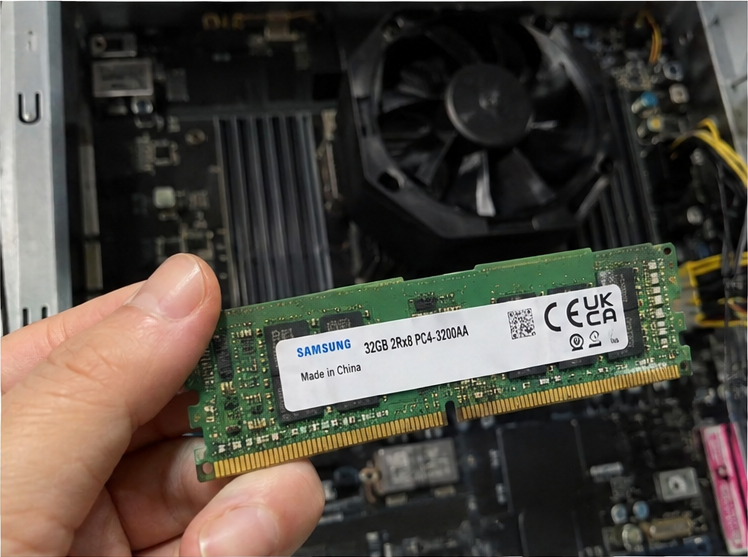
Hardware buyers often assume that identical DDR4 or DDR5 pin layouts guarantee electrical compatibility across enterprise and client systems. In my years consulting on client system integration and platform engineering, I have seen this single misconception cause massive supply bottlenecks. Let us break down the architectural barriers, electrical differences, and motherboard requirements you must verify before buying surplus hardware.
Why does memory architecture stop you from using server RAM in a desktop?
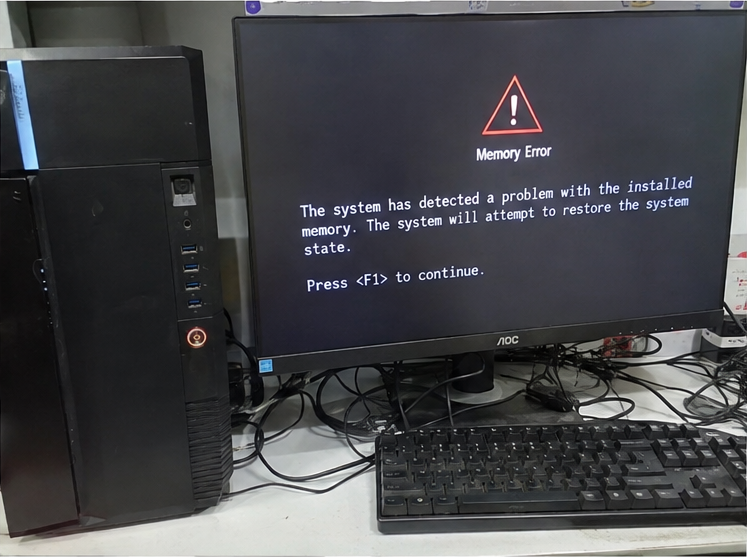
Sourcing low-cost memory on the secondary market looks appealing until unexpected POST failures halt deployment schedules. System builders waste hours reseating modules, assuming faulty contacts caused the boot error. The failure happens because server hardware features distinct buffering architectures that consumer memory controllers cannot address.
Memory architecture blocks server RAM in a desktop because enterprise modules typically feature physical registers or memory buffers (RDIMMs and LRDIMMs). Consumer motherboards and client CPUs only support Unbuffered DIMMs (UDIMMs)[^1], lacking the command signaling and clock multiplexing circuitry needed to communicate with enterprise register chips.
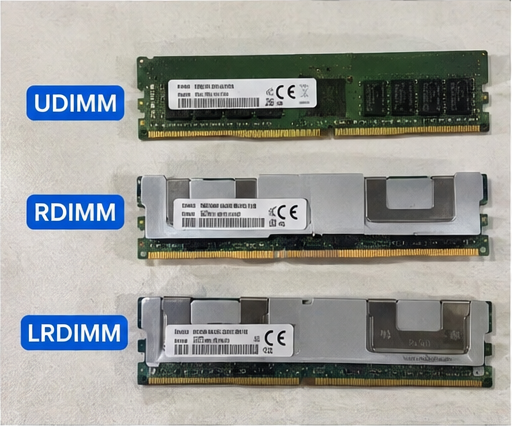
The Critical Divide: UDIMM vs. RDIMM vs. LRDIMM
The phrase "server memory" is broad and often misleading. The core issue is not simply Error-Correcting Code (ECC) technology. The fundamental barrier lies in how the memory module manages electrical loading on the memory bus.
- Unbuffered DIMMs (UDIMMs): Standard consumer desktop RAM. The Integrated Memory Controller (IMC) inside the CPU talks directly to every DRAM chip on the stick.
- Registered DIMMs (RDIMMs): Standard enterprise server RAM. A hardware register chip (RCD) sits on the module between the memory controller and the DRAM chips.[^2] This register buffers command and address lines, reducing electrical strain on the CPU memory controller so servers can support dozens of modules simultaneously.
- Load-Reduced DIMMs (LRDIMMs): High-density enterprise memory. These modules buffer both command/address lines and data lines using a specialized buffer chip[^3], allowing massive capacities across multi-socket systems.
Consumer CPUs (such as Intel Core or standard AMD Ryzen APUs) feature memory controllers engineered solely for direct DRAM signaling. When you insert an RDIMM into a consumer desktop board, the CPU memory controller expects direct communication. Instead, it hits the register chip, receives no valid presence-detect handshake, and fails to POST. The system stays completely silent with an active DRAM debug LED.
| Specification Attribute | Unbuffered DIMM (UDIMM) | Registered DIMM (RDIMM) | Load-Reduced DIMM (LRDIMM) |
|---|---|---|---|
| Typical Target Platform | Consumer Desktops, SOHO PCs | Enterprise Servers, Workstations | High-Density Compute Clusters |
| Command Buffering | None (Direct to DRAM) | Hardware Register (RCD) | Memory Buffer Chip |
| Data Line Buffering | None | None (Direct Data Path) | Fully Buffered Data Paths |
| Consumer Desktop POST | Guaranteed Compatible | Complete Failure (No POST) | Complete Failure (No POST) |
| Typical Capacity Range | 8 GB to 32 GB per stick | 16 GB to 128 GB per stick | 64 GB to 256 GB+ per stick |
I often talk with procurement clients who secure decommissioned data center inventory at steep volume discounts. They attempt to repurpose hundreds of DDR4 RDIMMs into standard office client towers. Every single unit refuses to boot. The physical 288-pin edge connector slides into the desktop slot smoothly, but the electrical interface remains incompatible.
Can unbuffered ECC server RAM in a desktop actually work?
System integrators seeking data reliability often look to unbuffered enterprise memory for entry-level workstations. Many buyers assume all ECC modules automatically function as enterprise hardware. While certain combinations work, operating without proper validation exposes your operating system to silent data corruption and unexpected memory panics.
Unbuffered ECC server RAM in a desktop can work if your motherboard BIOS and CPU memory controller explicitly support ECC UDIMMs. AMD Ryzen desktop processors generally boot with unbuffered ECC memory, whereas mainstream Intel Core desktop processors either disable error correction or completely reject the module.
Platform Validation and the ECC Support Triangle
Unbuffered ECC memory (ECC UDIMM) uses the exact same command architecture as normal desktop memory. The key difference is an extra memory chip on the PCB dedicated to holding parity bits for Error-Correcting Code calculations[^4]. This means there is no register chip standing between the memory controller and the DRAM chips.
Even so, getting true hardware error handling requires what I call the ECC Support Triangle:
- CPU Memory Controller Support: The physical processor must feature active data-bus routing for parity bits. Standard AMD Ryzen desktop CPUs generally include these lines. Intel desktop processors historically disable this feature on Core i3, i5, i7, and i9 models, restricting ECC support strictly to Xeon and select commercial enterprise platforms (like Intel Core with W-series chipsets).
- Motherboard Trace Layout and BIOS Routing: Even if the processor supports ECC, the motherboard maker must physically route the extra parity traces through the board layers to the DIMM slots. Furthermore, the UEFI/BIOS must contain active firmware tables to configure, monitor, and clear ECC registers.
- Operating System Reporting: Your operating system must properly query hardware error banks (via WHEA on Windows or EDAC on Linux)[^5]. Without OS hooks, single-bit corrections occur invisibly, or multi-bit errors trigger unexpected crashes without logging diagnostic data.
Important Deployment Note: Many consumer motherboard manufacturers market their boards as "ECC Supported." Look closely at the small print in the technical manual. In most cases, it reads: "Supports ECC UDIMM memory modules, but operates in non-ECC mode."
In that scenario, your expensive unbuffered server RAM functions merely as standard, unvalidated desktop RAM. You pay an enterprise price premium without gaining any data-integrity protection.
How do enterprise RDIMMs differ when testing server RAM in a desktop?
Hardware buyers often view surplus enterprise memory as an economical way to max out local development machines. You see 32 GB and 64 GB DDR4 RDIMMs trading at fractions of their original price on secondary channels. Yet attempts to validate these modules on standard benches always lead to wasted diagnostic cycles.
Enterprise RDIMMs prevent desktop operation by modifying signal timings through their onboard Registering Clock Driver (RCD). Client motherboards cannot initialize or train this register chip during boot phase execution, which stops the system from reading basic memory serial presence detect (SPD) data.
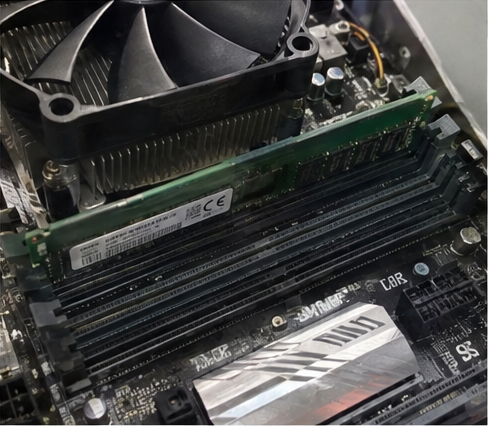
The Mechanics of Initialization Failures
To understand why registered server RAM in a desktop fails, you must understand the basic Power-On Self-Test (POST) memory training sequence.
When you switch on a system, the motherboard sends basic power rails (VDD, VDDQ, VPP) to the memory slots. The system reads small EEPROM chips on the sticks called Serial Presence Detect (SPD) chips using the I2C/SMBus protocol[^6]. The SPD chip communicates the memory's rated speeds, CAS latencies, and module type to the BIOS.
[System Power Applied]
         │
         ▼
[Read SPD via SMBus] ───► BIOS identifies Module Type: RDIMM / Registered
         │
         ▼
[Check Memory Controller] ───► Client CPU lacks RCD control circuits
         │
         ▼
[Memory Training Fails] ───► Error State: No POST / Code 55 / Continuous Beeps
On a consumer motherboard, this initialization sequence collapses instantly:
- SPD Incompatibility: The consumer BIOS reads the module flag indicating a registered module. If the firmware lacks microcode profiles for RCD initialization, it halts execution right away.
- Clock and Command Phase Inversion: In an RDIMM, the RCD buffers the command, address, and clock signals, adding a clock-cycle latency delay between the controller and the DRAM[^7]. A client CPU memory controller expects immediate, unbuffered response edges. Because it does not know how to compensate for the register's latency delay, signal timing calibration fails completely.
- Electrical Rail Inconsistencies: Enterprise modules often demand specific power management states or secondary voltage rails configured for server system topologies. Some high-density RDIMMs also feature unusual thermal sensor pins that do not match consumer power distribution lines.
During my client consultations, procurement teams often ask if custom BIOS mods or third-party firmware updates can bypass this issue. The answer is an absolute no. This is an immutable physical constraint: the CPU die itself lacks the register control lines and clock phase circuits required by registered server memory.
Which workstation platforms officially support server RAM in a desktop?
System builders who genuinely need massive memory capacities or enterprise ECC support often feel stuck between high-end systems and consumer limits. If standard consumer boards reject enterprise modules, you must select commercial workstation hardware designed to bridge that gap. Choosing the correct workstation tier lets you leverage reliable enterprise memory without purchasing a full-depth rack server chassis.
Workstation platforms like AMD Ryzen Threadripper Pro and Intel Xeon W officially support enterprise registered server RAM[^8] in a desktop workstation chassis. These high-end platforms feature memory controllers engineered specifically for multi-channel RDIMMs and LRDIMMs, enabling hundreds of gigabytes of reliable memory.
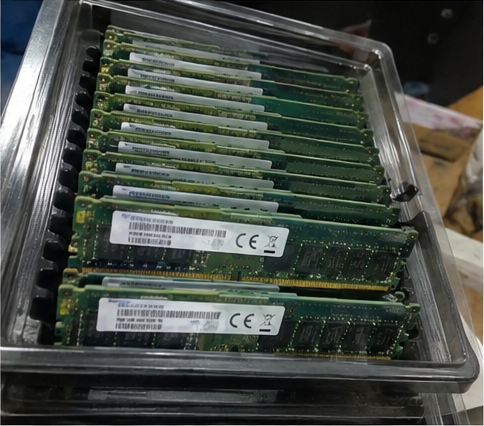
Choosing Platforms Designed for Enterprise Memory
If your workload demands enterprise memory densities or you have a large stockpile of surplus RDIMMs, you must match them with dedicated workstation platforms. These boards use standard desktop/tower form factors (such as E-ATX or CEB) but feature true enterprise-grade chipsets and socket routing.
Platform Compatibility Matrix for Business Deployments
Before issuing a purchase order for system builds or client upgrades, verify your platform choices using this architectural roadmap:
- Mainstream Consumer Tier (Intel Core 13th/14th Gen, AMD Ryzen 7000/8000/9000):
- Supported Memory: Standard UDIMMs only. Select AMD platforms boot with ECC UDIMMs (validation varies by vendor).
- Enterprise Module Status: RDIMMs, LRDIMMs, and 3DS-RDIMMs are completely incompatible.
- Best Use: Standard corporate productivity desktops and lightweight local engineering machines.
- Commercial Entry Workstation Tier (Intel Xeon E / Core with W680 Chipsets):
- Supported Memory: Standard UDIMMs and verified ECC UDIMMs.
- Enterprise Module Status: Registered modules remain unsupported.
- Best Use: Financial modeling systems, mission-critical edge gateways, and entry-level CAD workstations.
- Professional Workstation Tier (AMD Threadripper Pro, Intel Xeon W-2400 / W-3400):
- Supported Memory: Fully validates DDR4/DDR5 RDIMMs and select LRDIMMs. Standard consumer UDIMMs are often explicitly rejected on these platforms.[^9]
- Enterprise Module Status: Full operational support, enterprise error reporting, and multi-channel performance.
- Best Use: On-premise AI model fine-tuning, complex data simulations, and high-performance engineering workstations.
Real-World Procurement Traps on Secondary Markets
I often review supply proposals from buyers tempted by used enterprise components on liquidator sites. A 64 GB DDR4-3200 RDIMM might sell for under half the price of a standard 32 GB consumer desktop stick.
Buying those components for client office towers or mid-tier consumer desktop builds always results in stranded capital. Unless you specifically operate professional workstation sockets like AMD sTR5 or Intel LGA-4677, those registered sticks will never work.
Always cross-reference the manufacturer’s part number before buying bulk lots. A product number containing an "R" or "L" (for example, M393A... for Samsung RDIMMs or HMA...R... for SK Hynix Registered) confirms it is server memory. Consumer-safe modules will feature a "U" (UDIMM) designator.
Frequently Asked Questions
Can I damage my desktop motherboard by installing an RDIMM?
Physical damage is rare because key notches prevent voltage mismatches[^10], but damage can still happen. Forcing mismatched modules into the slot risks bending pins or overloading motherboards with non-standard power rail configurations. The board will typically cycle power safely, throw an error code, and halt.
Does DDR5 change whether server RAM works in standard desktops?
No, DDR5 maintains the exact same functional divide between consumer and enterprise platforms. Although client DDR5 modules feature on-die ECC for internal cell stability[^11], enterprise DDR5 memory still requires an external RCD (Registered Clock Driver), which consumer DDR5 motherboards cannot address.
Can unbuffered ECC RAM run at standard consumer speeds?
Yes, unbuffered ECC RAM runs at rated JEDEC speeds, but it generally does not support extreme overclocks or XMP profiles[^12]. Enterprise and industrial unbuffered memory prioritizes continuous signal integrity and baseline thermal stability over aggressive, high-speed timings.
Why is used server memory cheaper than desktop memory on secondary markets?
Enterprise data centers retire hardware on strict multi-year schedules, which floods wholesale markets with massive volumes of identical RDIMMs. Conversely, consumer UDIMMs are retired individually, creating lower wholesale supply and keeping client-compatible desktop memory prices higher.
Conclusion
Running server RAM in a desktop is fundamentally an architectural challenge rather than a simple compatibility toggle. While unbuffered ECC modules work on select hardware combinations, registered enterprise memory (RDIMM and LRDIMM) will never boot in standard client systems. Bypassing these physical memory constraints requires enterprise workstation platforms with explicit controller validation.
As an OEM/ODM hardware manufacturing partner, we help data center operators, system integrators, and distributors eliminate component risk across edge platforms, custom servers, and enterprise infrastructure. Contact our engineering team today to review your hardware specifications and secure validated compute solutions for your next deployment.
[^1]: "JEDEC memory standards", https://en.wikipedia.org/wiki/JEDEC_memory_standards. Standards published by JEDEC specify that unbuffered memory interfaces directly connect the integrated memory controller to DRAM ICs, excluding the register hardware necessary for RDIMM handshakes. Evidence role: mechanism; source type: institution. Supports: Standard client CPU integrated memory controllers only support direct DRAM signaling via unbuffered topologies.. Scope note: Some high-end desktop (HEDT) hybrid platforms blur the line between client and workstation specifications. [^2]: "DDR4 REGISTERING CLOCK DRIVER (DDR4RCD02)", https://www.jedec.org/standards-documents/docs/jesd82-31. JEDEC standard JESD82 defines the electrical operation of Registering Clock Drivers (RCDs), confirming they isolate the system memory bus from the capacitive loading of individual DRAM components. Evidence role: mechanism; source type: institution. Supports: RDIMMs place an RCD between the host controller and DRAM to buffer address, command, and control signals.. [^3]: "Memory Buffer", https://www.jedec.org/category/keywords/memory-buffer. Memory architecture research demonstrates that LRDIMMs employ distributed data buffers to present a single electrical load per module on the data bus, expanding supported system capacities. Evidence role: mechanism; source type: research. Supports: LRDIMMs utilize isolation data buffers (iMBs or data buffers) to decouple both data lines and command/address paths from the host bus.. Scope note: Exact implementation topologies differ slightly between DDR3, DDR4, and DDR5 standards. [^4]: "Dram (unit)", https://en.wikipedia.org/wiki/Dram_(unit). JEDEC module raw card design specifications establish that 72-bit unbuffered DIMMs include additional memory ICs to store Hamming-code parity bits for hardware error correction. Evidence role: definition; source type: institution. Supports: ECC unbuffered memory includes an extra DRAM chip to provide an expanded 72-bit data bus (64 data bits plus 8 check bits).. [^5]: "Windows Hardware Error Architecture", https://en.wikipedia.org/wiki/Windows_Hardware_Error_Architecture. Kernel documentation confirms that subsystems such as Linux EDAC and Microsoft WHEA poll or receive interrupts from hardware error registers to report single-bit corrections and multi-bit faults. Evidence role: mechanism; source type: research. Supports: OS-level detection frameworks like Linux EDAC and Windows WHEA query hardware machine check architecture registers to log memory anomalies.. Scope note: Error reporting depends on firmware properly exposing ACPI APEI or MCA tables to the kernel. [^6]: "Serial presence detect", https://en.wikipedia.org/wiki/Serial_presence_detect. JEDEC Standard No. 21-C establishes the byte map and communication protocol for Serial Presence Detect (SPD) devices across system initialization routines. Evidence role: definition; source type: institution. Supports: BIOS/UEFI reads memory module characteristics from an onboard EEPROM over SMBus using JEDEC-defined SPD data structures.. [^7]: "Registered memory", https://en.wikipedia.org/wiki/Registered_memory. Engineering analyses of enterprise memory subsystems confirm that registered clock driver buffers introduce an inherent one-cycle latency offset relative to direct unbuffered signaling. Evidence role: mechanism; source type: research. Supports: Registering Clock Drivers incur a one-clock-cycle propagation delay while latching and re-driving command and address signals.. Scope note: Overall memory throughput remains comparable despite the singular command latency cycle. [^8]: "AMD Ryzen™ Threadripper™ Processors for Workstations ...", https://www.amd.com/en/products/processors/workstations/ryzen-threadripper.html. Platform documentation from AMD and Intel validates that enterprise workstation processors incorporate specialized memory PHYs and BIOS tables engineered to train registered DDR4/DDR5 modules. Evidence role: expert_consensus; source type: institution. Supports: Professional workstation platforms like Threadripper Pro and Xeon W provide multi-channel memory controllers validated for RDIMMs.. Scope note: Supported speeds and maximum channel configurations vary depending on specific processor generations. [^9]: "DIMMs the way I see it! A Threadripper Pro Memory Ramble", https://www.youtube.com/watch?v=MiSzRnFFMBs. Hardware compatibility matrices for high-end workstation platforms indicate that system firmware restricts boot execution exclusively to registered (RDIMM/3DS RDIMM) topologies, rejecting standard UDIMMs. Evidence role: general_support; source type: other. Supports: Certain enterprise workstation platforms reject unbuffered non-ECC modules at the firmware level.. Scope note: A small number of entry-level workstation platforms support both ECC UDIMM and non-ECC UDIMM modules. [^10]: "JEDEC memory standards", https://en.wikipedia.org/wiki/JEDEC_memory_standards. JEDEC MO-series mechanical design standards define specific physical notch coordinates for memory form factors to eliminate catastrophic electrical mismatches during insertion. Evidence role: definition; source type: institution. Supports: Standardized mechanical key notch locations prevent modules with incompatible voltage requirements or pinouts from mating with sockets.. [^11]: "(techtechpotato)Why DDR5 does NOT have ECC (by default)", https://www.reddit.com/r/hardware/comments/nupdxo/techtechpotatowhy_ddr5_does_not_have_ecc_by/. JEDEC Standard JESD79-5 specifies that DDR5 on-die ECC corrects single-bit errors inside the storage array to improve yield and reliability, distinct from bus-level sideband ECC. Evidence role: mechanism; source type: institution. Supports: DDR5 standardizes internal on-die ECC to correct bit errors within high-density DRAM dies before data leaves the chip.. Scope note: On-die ECC does not protect data in transit across the memory bus between the CPU and DIMM. [^12]: "How should I set my RAM (JEDEC vs XMP)? : r/buildapc", https://www.reddit.com/r/buildapc/comments/eecjbw/how_should_i_set_my_ram_jedec_vs_xmp/. Industry guidelines from JEDEC show that industrial and enterprise modules program standard timing parameters into SPD blocks, omitting non-standard voltage and frequency tables like Intel XMP. Evidence role: general_support; source type: institution. Supports: Enterprise and industrial ECC memory strictly adheres to baseline JEDEC timing profiles rather than proprietary enthusiast overclocking extensions.. Scope note: A limited number of boutique enthusiast memory vendors have historically released niche overclockable ECC modules.
发表回复